Assumptions kill startups

The most common theme in my early failed startup attempts was that I made a lot of assumptions about how my ideas would play out in the real world that later turned out not to be true. And while I have no plans to work on another startup, I do chat with a lot of folks working on startups so I want to elaborate on this lesson learned in the hope that it will benefit a few of you future founders out there.

A hypothetical startup

When I was working heavily on Lean Domain Search, I used a service called Commission Junction (CJ) to manage its affiliate programs. CJ’s internal performance reports were terrible so I wound up building a script that signed in, scraped all of the reports, and then presented the key metrics to me in an internal dashboard. It helped me quickly gain insights about Lean Domain Search’s performance that were painful and time consuming to glean from CJ itself.

This gave me I had an idea: what if I built a startup that helped other companies using CJ gain similar actionable insights from their CJ data? They’d pay my startup $XX/month and I’d help them make more intelligent decisions about their affiliate programs.

I added it to my Workflowy “Startup Ideas” list and fortunately that’s all that ever came of it.

What assumptions did I make?

Here are a few:

  • Scraping CJ does not violate their Terms of Service
  • Companies would be willing to provide me their CJ login credentials so I could scrape their performance reports
  • I’d be able to figure how how to securely encrypt and decrypt those credentials so a database breach would not also lead to their CJ accounts being compromised
  • That there are companies that are dissatisfied by the reports CJ already provides
  • That there are a lot of them
  • That they’re also willing to pay for a better analysis
  • That they’d gain enough value after becoming customers to stick around for a long time
  • That they would somehow find my service
  • That CJ wouldn’t just change their reports to include the improved analysis my service would provide

Ugh.

You could make long list like this for almost any startup. Imagine making one for Uber or AirBnB when they were at the idea stage. The lists would be massive. But… if you don’t think through your assumptions and how you’re going to solve them, you drastically increase the odds that your startup will fail. For this CJ idea, if any one of those assumptions turned out to be insurmountable, the startup would probably fail.

If you had asked me about my assumptions when I originally came up with the CJ idea, I probably wouldn’t have been able to come up with the same list of assumptions as I did above but likely would have thought of at least several of them. The more experienced you get, the more you’ll be able to identify the pitfalls in your ideas. This is also why you should get advisors who can help you identify areas that you’re overlooking.

One final point: a lot of the issues in the list have to do with customers and their need for a service like this. Many of these assumptions can be validated using customer development techniques. To learn more, I highly recommended the Lean Startup book by Eric Ries.

If you’re bouncing around any startup ideas, feel free to reach out and I’d be happy to provide feedback on them.
Taking Screenshots Like a Boss

Today I’d like to share a few tips and resources for taking and managing screenshots on Macs. We’ll start with the basics and move on to the more advanced tactics.

Take a screenshot of your entire screen

Command-Shift-3

Take a screenshot of a portion of your screen

Command-Shift-4 then highlight the area you want to capture

Take a screenshot of a specific window

Command-Shift-4 then press space then click on a window

Change the directory where your screenshots are saved

By default they’re saved to the desktop, but you can change the destination.

Take a screenshot of an entire webpage, part 1

For this I highly recommend the Blipshot Chrome extension by Automattician Davide ‘Fol’ Casali. It will automatically scroll down the page, take a screenshot of each section, and piece them together into a single screenshot that you can save to your computer.

Take a screenshot of an entire webpage, part 2

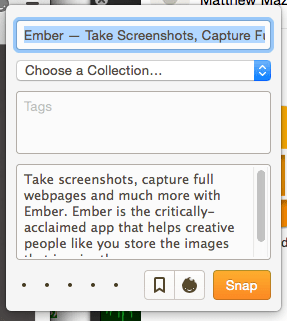
If you find yourself taking a lot of screenshots and are interested in a way to organize them, check out the Ember Mac app.

When you use its Chrome extension to take a screenshot, you can specify a category which will group those screenshots together:

Screen Shot 2015-12-07 at 1.41.45 PM.png

You can then browse your collections in the Ember Mac app.

The major downside to Ember though is the way it takes screenshots. Unlike Blipshot which will take a screenshot of the page as it currently stands, Ember seems to reload the page internally and then take a screenshot of that freshly reloaded page. So if you’re working with a JavaScript-heavy site, Ember’s screenshots won’t reflect any of the changes that have taken place since you loaded the page. Also, Ember doesn’t work with Flash websites.

My hacky workflow for managing screenshots is to use a combination of Ember and Blipshot. For capturing simple websites that I want to organize (where a screenshot of a freshly loaded page will do and it doesn’t use Flash) I use Ember. For sites where I want the screenshot to reflect the current state of the front-end or sites that use Flash, I take a screenshot with Blipshot, then drag it into the appropriate collection in the Ember app.

One question for you all

One thing that’s frustrating is taking screenshots on a Retina displays because all of the screenshots wind up 2x the size that they appear on the screen. Is there a simple way to take a screenshot on a Retina display and have not be 2x? When it’s important that the screenshot not be 2x, I load it in Pixelmator and shrink it to 50% of its original size. Kind of a pain though.

The Little, Brown Book of Anecdotes

Screen Shot 2015-12-06 at 2.05.37 PM.png
One of my favorite things to read is The Little, Brown Book of Anecdotes by Clifton Fadiman. The book contains over 4,000 anecdotes by more than 2,000 famous people.

Here are a few examples:

A devotee of cigars, Mark Twain was temptuous of those who made a great to-do about giving up smoking. He always claimed that it was easy to quit: “I’ve done it a hundred times!”

Henry Ford was once asked why he made a habit of visiting his executives when problems arose rather than calling them to his own office. “I go them to save time,” explained Ford. “I’ve found that I can leave the other fellow’s office a lot quicker than I can get him to leave mine.”

On arrival at a Chicago hotel, Thomas Du Pont found that a lady who had previously occupied his room had left behind a frilly nightgown. He summoned the manager, handed him the garmet, and instructed, “Fill it and bring it back.”

If you decide to buy it I recommend the Kindle edition simply because the paperback edition is massive. I also recommend not trying to read it straight through; I enjoy flipping it open to a random page and to just start reading regardless of whether I’ve heard of the person or not because it exposes me to a lot of history that I probably would never learn about otherwise.

As one of the Amazon reviewers commentedI envy you if you are discovering this for the first time. Check it out.

My Favorite Blog

If I had to choose a single blog to follow and ditch all the rest, it would be WaitButWhy by Tim Urban and Andrew Finn.

Tim takes complex topics, researches the hell out of them, and then teaches his readers on WaitButWhy what he learned.

Here’s how he explains his approach to learning:

I’ve heard people compare knowledge of a topic to a tree. If you don’t fully get it, it’s like a tree in your head with no trunk—and without a trunk, when you learn something new about the topic—a new branch or leaf of the tree—there’s nothing for it to hang onto, so it just falls away. By clearing out fog all the way to the bottom, I build a tree trunk in my head, and from then on, all new information can hold on, which makes that topic forever more interesting and productive to learn about. And what I usually find is that so many of the topics I’ve pegged as “boring” in my head are actually just foggy to me—like watching episode 17 of a great show, which would be boring if you didn’t have the tree trunk of the back story and characters in place.

The posts tend to be long but don’t let that disuade you; they’re entertaining and packed with knowledge that will reshape the way you see the world. My favorites include his posts about the Fermi Paradox, AI, and Elon Musk and his companies:

Also, whether you’re a long time reader or just discovering WaitButWhy, consider donating via their Patreon page so that Tim and Andrew can continue publishing WaitButWhy for many years to come.