Running Mistral 7B Instruct on a Macbook

Similar to yesterday’s post on running Mistral 8x7Bs Mixture of Experts (MOE) model, I wanted to document the steps I took to run Mistral’s 7B-Instruct-v0.2 model on a Mac for anyone else interested in playing around with it.

Unlike yesterday’s post though, this 7B Instruct model’s inference speed is about 20 tokens/second on my M2 Macbook with its 24GB of RAM, making it something a lot more practical to play around with than the 10 tokens/hour MOE model.

These instructions are once again inspired by Einar Vollset’s post where he shared his steps, though updated to account for a few changes in recent days.

Update Dec 19: A far easier way to run this model is to use Ollama. Simply install it on your Mac, open it, then run ollama run mistral from the command line. However, if you want to go the more complex route, here are the steps:

1) Download HuggingFace’s model downloader

bash <(curl -sSL https://g.bodaay.io/hfd) -h

2) Download the Mistral 7B Instruct model

./hfdownloader -m mistralai/Mistral-7B-Instruct-v0.2

For me, I ran both of the commands above in my ~/code directory, and the downloader downloaded the model into ~/code/Storage/mistralai_Mistral-7B-Instruct-v0.2.

3) Clone llama.cpp and install the necessary packages

Using the GitHub CLI:

gh repo clone ggerganov/llama.cpp

And after you have it cloned, install the necessary packages:

python3 -m pip install -r requirements.txt

4) Move the 7B model folder into llama.cpp/models

5) Convert to F16

python3 convert.py models/mistralai_Mistral-7B-Instruct-v0.2 --outfile models/mistralai_Mistral-7B-Instruct-v0.2/ggml-model-f16.gguf --outtype f16

6) Quantize it

./quantize models/mistralai_Mistral-7B-Instruct-v0.2/ggml-model-f16.gguf models/mistralai_Mistral-7B-Instruct-v0.2/ggml-model-q4_0.gguf q4_0

7) Run it

./main -m ./models/mistralai_Mistral-7B-Instruct-v0.2/ggml-model-q4_0.gguf -p "I believe the meaning of life is" -ngl 999 -s 1 -n 128 -t 8

Alternatively, run the built-in web server:

make -j && ./server -m models/mistralai_Mistral-7B-Instruct-v0.2/ggml-model-q4_0.gguf -c 4096

Unless you have a very powerful Macbook, definitely experiment with this model instead of the MOE model 🤣.

Running Mistral 8x7Bs Mixture of Experts on a Macbook

Below are the steps I used to get Mistral 8x7Bs Mixture of Experts (MOE) model running locally on my Macbook (with its Apple M2 chip and 24 GB of memory). Here’s a great overview of the model for anyone interested in learning more. Short version:

The Mistral “Mixtral” 8x7B 32k model,developed by Mistral AI, is a Mixture of Experts (MoE) model designed to enhance machine understanding and generation of text. Similar to GPT-4, Mixtral-8x7b uses a Mixture of Experts (MoE) architecture with 8 experts, each having 7 billion parameters.

Mixtral 8x7b has a total of 56 billion parameters, supports a 32k context window, and displaces both Meta Llama 2 and OpenAI GPT-3.5 in 4 out of 7 leading LLM benchmarks.

These step below were inspired by those shared by Einar Vollset on X, but specific to the 8x7B MOE model, not the Mistral-7B-Instruct-v0.2 model, and taking into account recent changes to the llama.cpp repo to support this model.

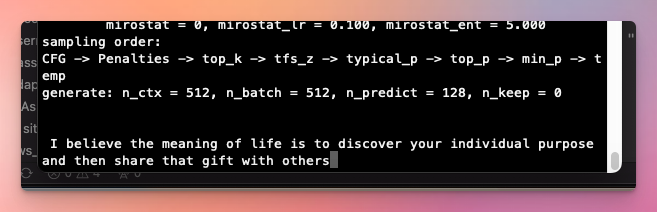
Note that Einar’s 16gb Macbook generated 10 tokens/second with the Instruct model, but my 24gb Macbook absolutely crawled running this MOE model, generating more like 10 tokens/hour, and becoming unusable in the process. Here’s my command line output if anyone can help me figure out why it’s so slow, though it’s likely that the model is just too much this hardware. Unless you have a very powerful Macbook, I’d recommend running the Mistral 7B Instruct model instead of this 8x7Bs MOE model.

1) Clone llama.cpp and install the necessary packages

gh repo clone ggerganov/llama.cpp

This uses the GitHub CLI, though it isn’t completely necessary.

After you have it cloned:

python3 -m pip install -r requirements.txt

2) Download the model torrent

I use µTorrent, though any other torrent app will do.

Here’s a direct link to the torrent.

3) Move the model directory into llama.cpp/models

4) Convert the model to F16

python3 convert.py ./models/mixtral-8x7b-32kseqlen --outfile ./models/mixtral-8x7b-32kseqlen/ggml-model-f16.gguf --outtype f16

This converts the model to a 16-bit floating-point representation to reduce the model’s size and computational requirements.

5) Quantize it

./quantize ./models/mixtral-8x7b-32kseqlen/ggml-model-f16.gguf ./models/mixtral-8x7b-32kseqlen/ggml-model-q4_0.gguf q4_0

Quantizing the model reduces the precision of the numbers used in a model, which can lead to smaller model sizes and faster inference times at the cost of some accuracy. The “q4_0” means that the model is being quantized to use 4-bit representation for each number.

6) Use it

Either via the command line:

./main -m ./models/mixtral-8x7b-32kseqlen/ggml-model-q4_0.gguf -p "I believe the meaning of life is" -ngl 999 -s 1 -n 128 -t 8

Or the built-in web app:

make -j && ./server -m models/mixtral-8x7b-32kseqlen/ggml-model-q4_0.gguf -c 4096

Enjoy!