
Retention Rate Terminology

Yesterday my coworker Meredith and I were discussing retention rates and were stumped on what to call a certain retention metric. Specifically, what do you call the % of users that performed an event during the week following the user’s sign up date?
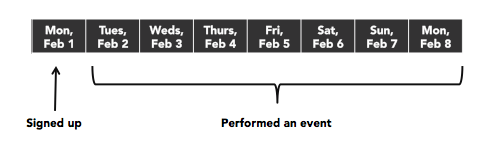
retention-rate.png

It’s an important metric to measure because for most services the sharpest drop-off will be the day users sign up so it’s useful to know what % of them return and use the service at some point in the week that follows.

I wound up tweeting about it and received a lot of responses which I’ll summarize below.

Before we dive into the options, it’s important to note that the day the user signed up is typically referred to as D0. Because users signed up that day, D0’s retention rate is always 100%. D1 then represents the % of users that were active on the day after sign up, D2 the % that were active two days after sign up, and so on.

Here are a few options with my 2c on their pros and cons:

Week 1 retention or Week 1 active – The main problem here is that it’s easy to misinterpret for folks seeing it for the first time: Does this mean a user was active 0 – 6 days after signing up (though this doesn’t make sense when you think about it because 100% of users are active on day 0) or 1 – 7 days (the first week after the sign up date)? Or if you confused it with the similarly-named 1 week retention does it mean 7 – 13 days (one week after the sign up date) or 8 – 14 days (one week after the day after sign up)? 😱

Post-first day active users, week one – +1 for specificity, -2 for the length :)

Week 0 retention or Week 0 active – This is less ambiguous, and is probably my second choice for what to call this metric. “Week 0 retention” would have to mean 1 – 7 days after sign up because a user isn’t considered retained on the sign up date and the zero makes it difficult to represent anything beyond days 1 – 7. The main problem for me is just that it takes too much thought and will constantly have to be explained to folks.

D1-7 – This is my favorite because there’s no ambiguity plus it’s nice and short. To me it’s hard to interpret this as anything but the metric we’re after. The downside is that it’s cumbersome to say out loud (“the day one to seven retention rate”) but in the end I think the pros outweigh that con. Hat tip Jan Piotrowski for suggesting it.

Thanks everyone for their feedback, especially Meredith who asked the question and whose insights on the naming I largely echoed in this post.

Analytics Event Name Cardinality

As a follow-up to my post about analytics event naming conventions, I want to share a few thoughts about event name cardinality aka how many distinct event names to track in your analytics tools.

Consider four events that a user can perform: signing up for an account, publishing a post, publishing a page, and publishing an image.

How many analytics events should this be? We have a few options:

Four

  1. Sign Up
  2. Publish Post
  3. Publish Page
  4. Publish Image

Three

  1. Sign Up
  2. Publish Post with an Image property set to true or false depending on whether the post consists of only an image
  3. Publish Page

Two

  1. Sign Up
  2. Publish with a Type property set to Post, or Page, or Image

One

  1. Perform Event with a Name property set to Sign Up or Publish with an additional Type property when the name is Publish set to Post, or Page, or Image

If you use a robust analytics tool like Mixpanel, Amplitude, KISSmetrics, or Tracks (Automattic’s internal analytics tool), you should in theory be able to perform any type of analysis using any of the options above.

For me, it comes down to what type of analysis you want to perform on the data, the types of properties on the event, and convenience.

Using the single event option will be a pain because you’ll constantly have to be specifying the Name property in the analytics tools to get the data you really want.

The decision between two, three, and four is close in this example. I think it comes down to whether you’re going to need a single Publish event in the types of analysis you’re performing. If knowing that the user published anything is important and each type publishing is conceptually similar, then having a single event might make sense. However, if your analysis is frequently going to focus on whether the user just published a post or just published a page or just published an image, having distinct Publish Post/Publish Page/Publish Image events is more convenient because you won’t constantly have to specify that you want the Publish event where the Type is Post. If publishing an image is similar to publishing a normal post, then maybe the three-event option is best.

At Automattic we went with three (Sign Up, Publish Post, Publish Page) and then added a feature to some of our tools (like our funnel builder) that let you specify a step can be one of several events (like publishing a post or publishing a page).

Hopefully this gives you a few things to think about next time you go to name new analytics events. If you can’t decide which route to go, feel free to reach out over email and I’d be happy brainstorm with you.

How would an evolving website work?

As a web developer who is also interested in A/B testing and evolution, it occurred to me that it would be fascinating to try to build a website that optimizes itself. I’ve been kicking around this idea for a while and wanted to share a few thoughts on it here to get feedback from anyone else that finds the idea promising.

Here’s the idea:

In traditional A/B testing, you specify multiple variations of some aspect of your site, measure which variation performs the best, then make the winner the default, and repeat. The types of things you test can range from simple headline and button color tests to complex tests that affect the user’s entire experience with your site.

In all of these cases though you have to figure out what variations you want to test. If you’re testing the headline, you need to specify which headlines you want to test. If you’re testing button color, you need to specify which colors to test, etc.

In the natural world, we see stunningly complex and optimized life forms that evolved little by little over billions of years. Evolution is similar to A/B testing in a sense, except that in evolution the variations happen by accident through genetic copying errors. Most of those mutations decrease the organism’s odds of reproducing, but occasionally they confer a benefit that causes that organism to have a better chance at surviving and reproducing. When that happens, the mutation gets passed on and may eventually spread to the rest of species over time. That “simple” process is what has led to all of the variety of life on earth.

Optimizing a web page through evolution poses many issues though.

How do you algorithmically mutate something on the page? Could you write a function that generates variations of a headline? Maybe. Would those variations be any good? Would you trust it enough to deploy into production?

I bet by analyzing tens of thousands of webpages, you could algorithmically identify common headline wording structures. Then maybe you could write code that intelligently customizes those headlines to your service.

You might be able to do the same with design. If you tried to categorize hundreds of homepage layouts, I expect you’d probably wind up with 20-30 common layouts that cover 90%+ of websites. Could you then write an algorithm that automatically tweaks your site’s layout to test these different layouts on your visitors? Could you do the same with color schemes? Maybe.

There’s also the problem of statistical significance. Running a simple two variation A/B test can take a long time if you don’t get a lot of traffic. Trying to get significant results for lots of algorithmically generated headlines might take forever. But maybe there are ways around that like the multi-armed bandit algorithm.

To sum it up, I think you’d need the following: a way to intelligently generate mutations on headlines, buttons, layout, etc + a ton of traffic or some novel method for picking the best variations + an organization that is willing to try such an experiment. It would not be easy, but I think it’s possible.

Imagine if it did work. Maybe your homepage converts users into sign ups at 10% now. You flip a switch, and in 6 months it increases your conversion rate 30% without any intervention on your part.

It would be revolutionary… if it worked.

Analytics Event Naming Conventions

When it comes to naming your analytics events, consistency is key.

For example, if you name one event “Signed In” (titleized, spaces, past tense), then name your signed-out event “Signed Out” not “signed out”, “Sign Out”, “signed_out”, “signOut”, etc.

Ideally you should decide on naming conventions before you start tracking any events. The reason is that once you start tracking an event under one name, most analytics services won’t let you rename it. You can rename the event you send the analytics service, but then you wind up losing the historical trends with the old name. Because of this, normally you’ll wind up sticking with the original name even if you later wish you could change it.

If you can, wrap the analytics event API call with your own validation logic to ensure that everyone is forced to use the same conventions. Also, create solid documentation so there’s a resource for new developers to learn best practices.

At Automattic we have our own internal analytics service called Tracks. Here’s a summary of the guidelines we provide our developers for event naming conventions:

  • Use lowercase letters.
  • Numbers are allowed.
  • Separate words with underscores.
  • Don’t abbreviate unnecessarilly.
  • Don’t programmatically create event names; hardcode them all. This prevents developers from accidentally flooding our analytics tools with thousands of event names. It also makes the event names easily searchable in our codebase.
  • For page loads, use “view”, not “visit”, “load”, etc.
  • Use present tense for verbs (why used “signed_out” when the shorter”sign_out” will do?). In practice most developers forget this so we don’t enforce it.

We also format our event names so that the source (Calypso, Akismet, etc) is first, the context is second, and the verb is at the end. This makes them appear next to each other in alphabetized event lists in our tools. For example:

akismet_product_purchase
akismet_product_refund
calypso_product_purchase
calypso_product_refund

There is an argument to be made for having a single product_purchase event and passing a property such as source that is set to akismet, calypso, etc but we generally don’t do that because a) Putting the source first lets us partition the databases based on it to make querying for events faster and b) In many cases even though the event is conceptually similar, they wind up varying a lot in the properties attached to them. For example, maybe on one service users buy plans and another service they buy upgrades. If both services share the same event name, you would probably want to ensure a consistent property name that represents what the user purchased. Do you use plan, upgrade or something more generic? To keep things simple, we simply use similar event names but prefix them with their source (ie, akismet_product_purchase and calypso_product_purchase).

We also enforce that property names use similar formatting conventions (lowercase, letters only, snake case).

I hope this gives you some things to think about next time you’re setting up tracking for your apps.

If you have any best practices at your company for naming events, I’d love to learn how you all go about it.