Hey friends – it’s been a while since I posted an update. I’ve been heads down on a number of things and just haven’t been prioritizing blogging, but figure it’s good to do every now and then. Shout out to the ~3 of you who read these :).
Crypto
For anyone who follows me on Twitter, you may have seen me periodically retweeting or favoriting bearish crypto tweets. For a long time I have been super bearish on crypto and honestly still am. I think we’re in a massive bubble at the moment that’s due to pop in a big way in part due to the mania wearing off and in part due to the massive amount of fraud in the market right now. And blockchain technology just doesn’t seem super useful.
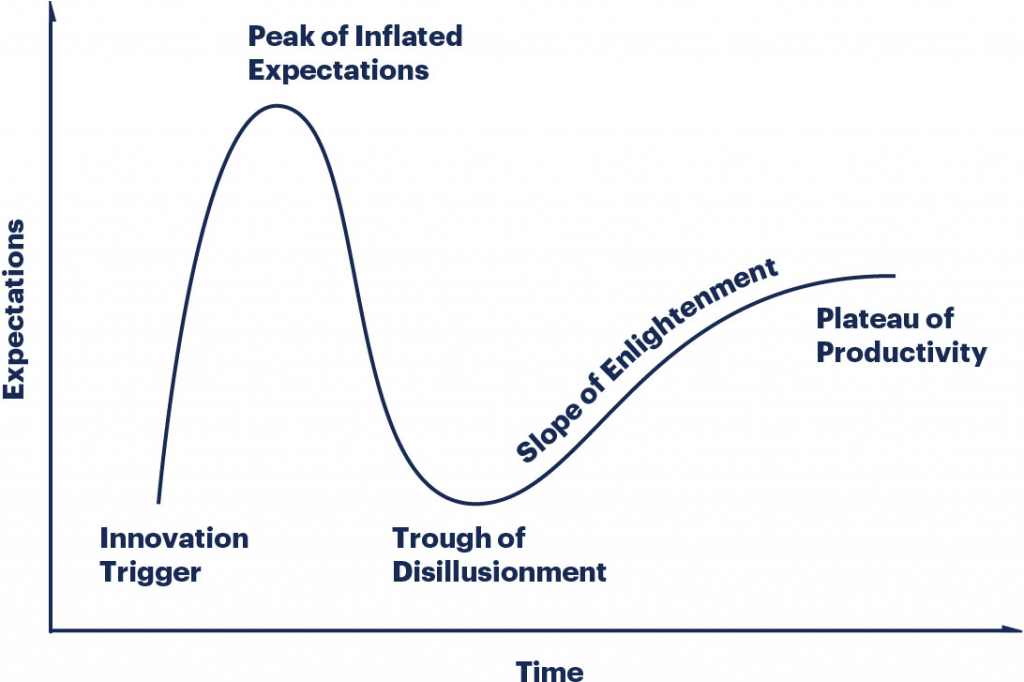
There’s a famous chart called the Gartner hype cycle that always comes to mind:
I’m of the opinion that we’re near the top of that Peak of Inflated Expectations curve, both in terms of crypto expectations and coin prices. But I do think there’s a chance that in the coming decade after the coming crash that we’ll see practical applications come out of all this.
Solana
In order to be more educated about crypto I’ve been investing a few hours each day into learning how to develop on the Solana blockchain. I’ve found it to be a pretty steep learning curve – I’m having to learn about blockchains, Solana, TypeScript, Rust, and how it all fits together. I don’t have any practical applications in mind yet, but am enjoying learning nonetheless.
I’m trying to keep an open mind – we’ll see what comes out of it all.
Preceden
I’ve made a ton of progress on Preceden in the last few months. Things like:
Revamping the homepage copy to focus on professionals
Introducing templates to make starting timelines easier
I haven’t been working on it as much the last few weeks because I’ve been putting time into learning Solana instead, but still have a lot planned for Preceden in the coming months.
Also, at the end of December 2020 I switched Preceden’s pricing to have recurring annual plans (whereas before they didn’t renew automatically), which means those renewals will start hitting in a few weeks. It should help drive a lot of revenue growth for Preceden in 2022. Fingers crossed the renewal rate is decent – we will see.
Help Scout
Mostly status quo for my contract work at Help Scout. Recent projects have included:
Setting up reporting to estimate cash payback (ie, if we spend $X acquiring a cohort of new customers, how long do we expect it to be paid back when looking solely at cash payments).
Updating Account Executive commission structures
Analyzing how customers are interacting with new pricing we introduced for Messages
Helping a bit with hiring: we’re currently in the process of hiring an Analytics Engineer and Product Analyst
I will be reducing my hours from 18/week to 12/week starting in January which will free up more time in my schedule for Preceden, Solana, and whatever else piques my interest in 2022.
What I’m reading
Speaking of crypto, I’ve been reading Memoirs of Extraordinary Popular Delusions and the Madness of Crowds by Charles MacKay, a fantastic book about past bubbles. It’s amazing how many parallels there are between previous bubbles and what we’re going through now in crypto. And things will probably end just as badly.
In this guide we’re going to dive into how to take a Solana keypair and break it its corresponding public and private keys.
Lets go ahead and use the Solana CLI to generate a new wallet with the keypair stored in a File System Wallet:
$ solana-keygen new --outfile ~/my-solana-wallet/demo.json

Generating a new keypair
For added security, enter a BIP39 passphrase
NOTE! This passphrase improves security of the recovery seed phrase NOT the
keypair file itself, which is stored as insecure plain text
BIP39 Passphrase (empty for none):
Wrote new keypair to /Users/matt/my-solana-wallet/demo.json
=============================================================================
pubkey: HAE1oNnc3XBmPudphRcHhyCvGShtgDYtZVzx2MocKEr1
=============================================================================
Save this seed phrase and your BIP39 passphrase to recover your new keypair:
favorite maid bind piece social father neutral over unusual tank brother code
=============================================================================
This command generates a JSON file containing the keypair:
While this isthe public key, it’s not in the same format as the public key displayed by the Solana CLI above. In order to format it that way, we need to convert this array of integer values into base 58.
In Ruby we’ll first convert the array to hex (base 16):
And then we can use a base 58 script to convert the hex into the base 58:
public_key = Base58.encode(public_key_hex)
And that gives us the same public key aka wallet address that we saw earlier in the Solana CLI output:
HAE1oNnc3XBmPudphRcHhyCvGShtgDYtZVzx2MocKEr1
We can follow the same process to get the base 58 private key:
KQ3cGFBdjJuRsB7U1K4to6cTGBPhgukqPgsi5pryr8v
And also the base 58 keypair (which is the same thing you would get if you clicked the Export Private Key button in a Phantom Wallet, but note that it’s not actually the private key, it’s the keypair with both the private and public key – I suspect they call it that to make it clear to users that it includes the private key):
2. Create a file called base58.rb and copy the base 58 Ruby script from this tutorial
3. Create another file named like keypair.rb and paste in the following script:
This file contains hidden or bidirectional Unicode text that may be interpreted or compiled differently than what appears below. To review, open the file in an editor that reveals hidden Unicode characters.
Learn more about bidirectional Unicode characters
4. Replace the content of keypair_bytes with the value from your File System Wallet (you can use solana config get to get the path to your keypair, then use the cat command like above to get the content).
5. Then from the command line simply run ruby keypair.rb to run the script:
You can follow a similar process to take a base 58 keypair (like you would get from Export Private Key in a Phantom wallet) to derive the public and private keys:
This file contains hidden or bidirectional Unicode text that may be interpreted or compiled differently than what appears below. To review, open the file in an editor that reveals hidden Unicode characters.
Learn more about bidirectional Unicode characters
Note that the installation script assumed I was using Bash and added the Solana CLI to Bash’s PATH variable, but my Mac is using the Z Shell (zsh), so I had to manually add the Solana CLI to the Z Shell PATH variable:
vi ~/.zshrc
export PATH="/Users/matt/.local/share/solana/install/active_release/bin:$PATH"
This will prompt for your Secret Recovery Phrase (which you can access through the Phantom Wallet’s settings). Enter it and when prompted to continue enter “y” to generate the local keypair file:
[recover] seed phrase:
[recover] If this seed phrase has an associated passphrase, enter it now. Otherwise, press ENTER to continue:
Recovered pubkey `abc123`. Continue? (y/n): y
Wrote recovered keypair to /Users/matt/.config/solana/id.json
If all went well you should be able to run a command like solana balance to access the account balance:
$ solana balance

0.123456789 SOL
You can also confirm that the file you generated above maps back to the public key associated with your Phantom wallet:
$ solana-keygen pubkey

abc123
Or verify that the public key is correctly associated with your local private key:
$ solana-keygen verify abc123

Verification for public key: abc123: Success




 Matt Mazur