Analytics Event Naming Conventions

When it comes to naming your analytics events, consistency is key.

For example, if you name one event “Signed In” (titleized, spaces, past tense), then name your signed-out event “Signed Out” not “signed out”, “Sign Out”, “signed_out”, “signOut”, etc.

Ideally you should decide on naming conventions before you start tracking any events. The reason is that once you start tracking an event under one name, most analytics services won’t let you rename it. You can rename the event you send the analytics service, but then you wind up losing the historical trends with the old name. Because of this, normally you’ll wind up sticking with the original name even if you later wish you could change it.

If you can, wrap the analytics event API call with your own validation logic to ensure that everyone is forced to use the same conventions. Also, create solid documentation so there’s a resource for new developers to learn best practices.

At Automattic we have our own internal analytics service called Tracks. Here’s a summary of the guidelines we provide our developers for event naming conventions:

  • Use lowercase letters.
  • Numbers are allowed.
  • Separate words with underscores.
  • Don’t abbreviate unnecessarilly.
  • Don’t programmatically create event names; hardcode them all. This prevents developers from accidentally flooding our analytics tools with thousands of event names. It also makes the event names easily searchable in our codebase.
  • For page loads, use “view”, not “visit”, “load”, etc.
  • Use present tense for verbs (why used “signed_out” when the shorter”sign_out” will do?). In practice most developers forget this so we don’t enforce it.

We also format our event names so that the source (Calypso, Akismet, etc) is first, the context is second, and the verb is at the end. This makes them appear next to each other in alphabetized event lists in our tools. For example:

akismet_product_purchase
akismet_product_refund
calypso_product_purchase
calypso_product_refund

There is an argument to be made for having a single product_purchase event and passing a property such as source that is set to akismet, calypso, etc but we generally don’t do that because a) Putting the source first lets us partition the databases based on it to make querying for events faster and b) In many cases even though the event is conceptually similar, they wind up varying a lot in the properties attached to them. For example, maybe on one service users buy plans and another service they buy upgrades. If both services share the same event name, you would probably want to ensure a consistent property name that represents what the user purchased. Do you use plan, upgrade or something more generic? To keep things simple, we simply use similar event names but prefix them with their source (ie, akismet_product_purchase and calypso_product_purchase).

We also enforce that property names use similar formatting conventions (lowercase, letters only, snake case).

I hope this gives you some things to think about next time you’re setting up tracking for your apps.

If you have any best practices at your company for naming events, I’d love to learn how you all go about it.
The State of Emergent Mind

In 2014 I worked on a side project called Emergent Mind to learn more about AI, artificial life and related topics. The result was 10 interactive JavaScript visualizations ranging from Boids to neural networks.

I really enjoyed working on it and received a lot of great feedback, but I had to put it on hold after the arrival of my son last fall. I’d say the projects took about 10 hours each on average so they weren’t that time consuming, but with a newborn, a fulltime job and other obligations and interests I had to put it on the backburner for a while.

I’ve been weighing in my mind whether or not to resume work on it.

Here’s my thought process:

The Pros

  • AI and especially artificial life are fascinating to me. The fact that we are all here now is a testament to the incredible power of emergence and evolution. If I won the lottery and never had to work again, I’d probably spend a good chunk of my time working on projects to explore these areas.
  • AI is playing a larger and ever-increasing importance in our lives. I think we’re going to see an explosion of AI-enabled products and services over the coming decades… hopefully in a good way. Devoting time to learning it now will position me well to play a part in that future.
  • My impression is that AI researchers don’t tend to work on products and product people don’t tend to work on AI so there are probably a lot of opportunies at the intersection of the two.

The Cons

  • It’s hard. These 10 projects barely scratched the surface. My backpropagation post is at about the limit of my current math skills. I might (and that’s a big might) be able to teach myself, but flipping through PDFs of machine learning texts like The Elements of Statistical Learning is pretty daunting. I could go back to school, maybe get a masters in machine learning, but that brings me to the next point…
  • There are huge opportunity costs. Every hour I spend learning and working on AI projects is one less hour I get to spend learning about growth, JavaScript, spending time with my wife and son, relaxing, etc. Given a choice between going from an intermediate JavaScript developer to an expert with a few months of work and going from a beginner at AI to an expert in 5-10 years of work it’s hard to justify the latter.
  • No one can say for sure how AI will play out, but the possibilities have a lot of smart people very concerned. Read this WaitButWhy post for a great introduction and Superintelligence by Nick Bostrom if you want to learn more.
  • I love building products, but just don’t have many practical applications in mind for this type of work. The state of the art machine learning work seems largely applied to things like computer vision (boring to me), self-driving cars (interesting, but hard to work on from my home office), increasing the accuracy of various prediction techniques (somewhat interesting to me, but still no product in mind) and virtual assistants (interesting, but seems hard to compete with Facebook, Microsoft, Google, Apple, etc). It might just be a lack of imagination, but I can’t think of many products at the intersection of web app development and AI that excite me. If I were to build something it would probably wind up being a product like The Grid, though calling that AI seems more like a marketing move than actual AI (what is actual AI though?).

So, for now anyway, I think Emergent Mind will continue to stay on the backburner. Maybe one day I’ll pick it up again. We’ll see.

I’d love to hear your thoughts.

How I Follow Twitter

Here’s my setup:

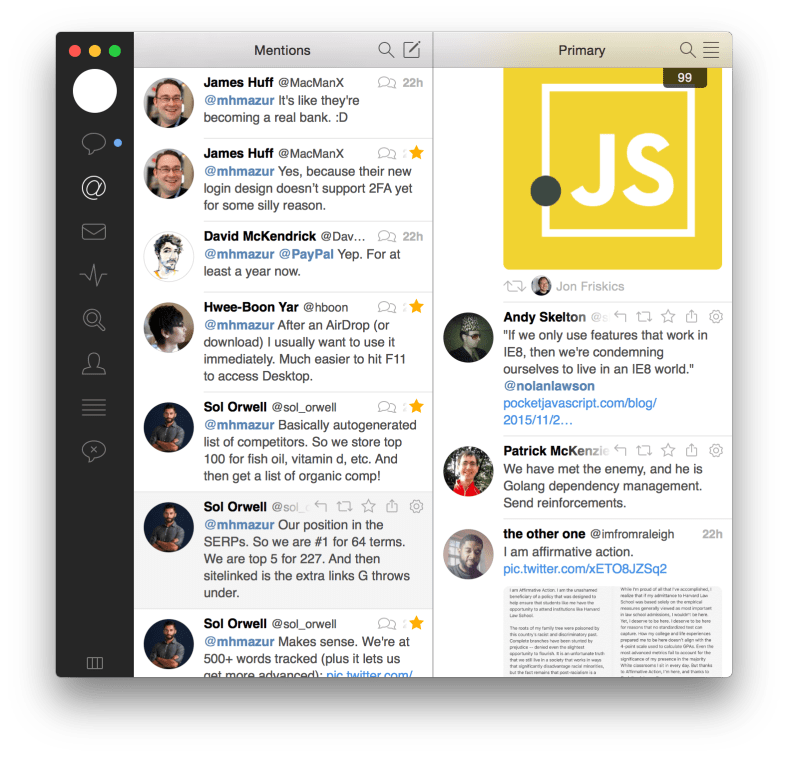
Screen Shot 2015-12-10 at 11.37.57 AM.png

I use the Tweetbot Mac app and have it configured to display two columns: one for mentions and one for tweets of folks in a private list of ~120 folks whose tweets I want to ensure I read.

I keep a list simply because I don’t have the time to read all of the tweets from the 1K+ people I follow. I keep it private simply because there’s no need for it to be public. I could unfollow folks so that I only follow the folks whose tweets I really want to read, but I’ve found keeping a list is simpler.

I’ve learned that my Twitter usage tends to follow a regular pattern: I follow a certain number of people and don’t have a problem reading all of their tweets, so I start to follow more people, get overwhelmed, then stop reading tweets all together. After a week or two I remove folks from the list so that it becomes manageable, start reading tweets again, then repeat the cycle.

After going through this several times, I’ve learned that for me it’s really important to limit the number of people I follow. If check Tweetbot and see that I have 500+ unread tweets, that’s typically when I stop following tweets entirely. With only ~120 people in the list and those folks typically producing a reasonable amount of tweets/retweets, I can usually miss a day or two and only have to catch up on 100-200 tweets which is usually no problem.

You’re probably on the list if we’ve ever chatted on Twitter, we’re friends at Automattic or in Orlando, or you’re a thought leader in the growth/startup/tech/science/AI space.

I wish I could follow more folks, but given the choice between following a limited amount and reading most of their tweets vs following a lot of folks and reading no tweets, I go with the first option. YMMV.

If you have any suggestions on how to improve this setup or have a workflow that works really well for you, I’d love to hear about it.

How to track your site’s search engine rankings

One thing I’d highly recommend to anyone with a website is to track your site’s search engine rankings for its key search terms. For sites that rely heavily on search traffic you’ll often find that the amount of traffic your site receives is directly related to where it ranks for its top search terms. It will also give you a sense of what terms you should optimize for which can play a major role in your site’s long term growth roadmap.

In this post I’ll show how I track rankings and combine that with data about how much traffic each term drives to determine which terms are important for my sites.

Tracking keyword rankings

I previously used SEOmoz (now just called Moz) to help track keyword rankings, but found that I was only using it for that and none of its other features. At $99/month for their cheapest plan, that was a bit much for my bootstrapper ways.

I did a little research and discovered SERPfox, a lightweight search engine rank tracker. (SERP stands for Search Engine Result Page.) At $10/month for 50 keywords, it’s hard to beat.

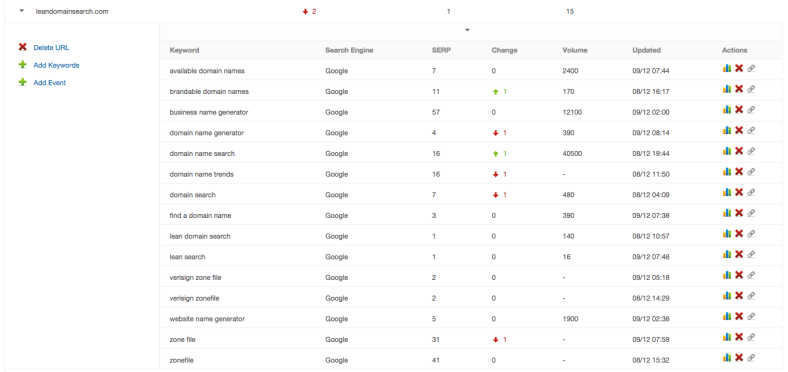
Here’s what I track for Lean Domain Search:

Screen Shot 2015-12-09 at 9.12.02 AM.png

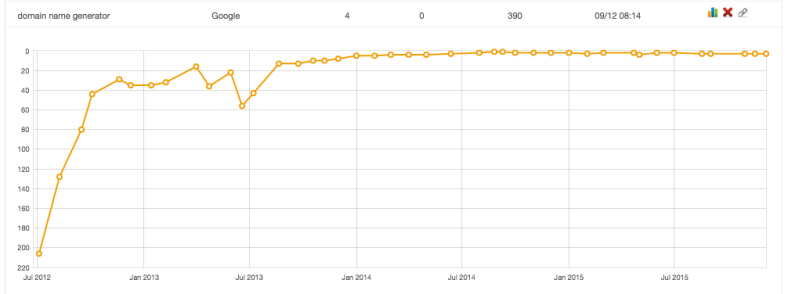
You can also view a chart showing its position for each keyword over time:

Screen Shot 2015-12-09 at 9.30.30 AM.png

Not all of the terms I track drive a lot of traffic, but it’s interesting to me to know where it ranks for terms like zonefile just for my awareness.

On that note, the time to start tracking keywords is ideally before you launchIt should be on your pre-launch checklist to set up keyword tracking because it’s most valuable when you can see the long term trends.

One other benefit to tracking rankings is that if your site’s traffic suddenly spikes or takes a nose dive, you can check your rankings to see if Google recently tweaked their algorithms and caused a major change in your rankings.

Adding volume into the mix

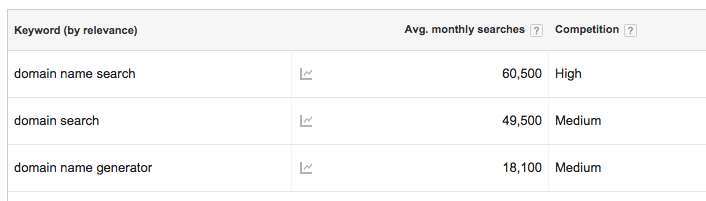
I’ve never had any issues with SERPfox’s reported rankings (searching Google in incognito mode always matches SERPfox’s reported rankings), but the volume they report doesn’t seem right. For example, it reports that domain name search has a monthly search volume of 40,500 and domain search 480, but Google Keyword Planner tells a different story:

Screen Shot 2015-12-09 at 9.24.45 AM.png

Google Webmaster Tools provides additional data for your consideration as well. It has Lean Domain Search’s top clicked keyword as domain name generator (1,702 clicks in the last 30 days), domain search is the tenth most clicked (112 clicks), and domain name search is the 38th most clicked (19 clicks). Piecing these together it kind of makes sense:

Screen Shot 2015-12-09 at 9.42.20 AM.png

domain name generator gets fewer searches, but Lean Domain Search ranks well for it so it drives a lot of clicks. domain name search gets the most searches, but Lean Domain Search is on the second page of results so it doesn’t get many clicks. domain search also gets a lot of searches, but because Lean Domain Search is #7 not as many people wind up clicking on it.

I’m coming for you, Instant Domain Search 😄 (currently #1 for both domain search and domain name search).

If you have any recommendations for other tools that piece all of this together, I’d love to check them out – let me know. Thanks!