What I’ve Been Up To

This morning I was catching up with my friend and coworker Dave Martin and we got to talking about blogging and how we both miss casual blogging: things like writing about what we’ve working on, what issues we’re running into, what we’re learning etc.

The problem for me boils down to this really high bar I have set in my head for what’s worthy of a blog post. I like writing long technical posts and it’s difficult getting used to the idea that short nontechnical posts are just fine too.

So, in an effort to get back into blogging, here’s a quick update on what I’ve been up to:

I’ve been at Help Scout now for about 4½ months and am really enjoying it. My coworkers are awesome, I love the product, and I’m really getting to level up my data science and analytics skills which I plan to write more about in the future.

My only side project these days is my 7-year old timeline maker service, Preceden. Besides about an hour of customer support each week (via Help Scout, of course), it’s almost entirely passive, though I try to put a few hours into product development and marketing each month to keep improving it.

On the home front, my two year old son and one year old daughter are doing great. I feel incredibly lucky to work remotely which lets me spend more time with them and my wife each day.

I’ve been trying to focus more on my health lately, not because of any major issues, just in an effort to feel more energetic and less stressed each day. Things like sleeping and exercising more, avoiding coffee, meditating, not checking the news so often, etc. I’ve had mixed success maintaining these efforts long term though… it’s a work in progress :).

If we haven’t chatted in a while, I’d love to catch up. Drop me a note anytime by email at matthew.h.mazur@gmail.com or on Twitter/Telegram @mhmazur. Cheers!
How to Schedule Cloning your Heroku Postgres Database Locally

In my last post, I wrote about how to set up a Bash alias to pull your Heroku data into a local Postgres database. This post takes it a step further by showing how to automate it so that the database is automatically updated on a regular basis.

Background

We left off the last post with this Bash alias:

alias prdb="dropdb preceden_production_copy; PGUSER=postgres PGPASSWORD=password heroku pg:pullHEROKU_POSTGRESQL_MAGENTA preceden_production_copy --app sushi"

This lets me run prdb which first deletes my local database copy, then pulls the production data into a new one.

When attempting to schedule this as a cronjob, I ran into several issues.

First, dropdb won’t work if the database is being used by any applications. You’ll get an error message like:

dropdb: database removal failed: ERROR:  database "preceden_production_copy" is being accessed by other users

This is a problem because I usually leave Metabase and SQLPro for Postgres open which causes dropdb to throw and error which causes pg:pull not to work because the database already exists. I then have to shut down the apps and try again, and even then there’s often some hidden connection that requires a complete reboot.

Second, it usually takes about half an hour for pg:pull to load all of the data into a database. If I’m eager to dive into the latest data, it’s frustrating to have to wait that long to do it.

Lastly, you can’t use aliases in a cronjob, meaning you’d have to duplicate the content of the alias in the cronjob.

As we’ll see, we can work through each of these issues.

Solution

There’s a way with Postgres to drop existing connections. By excuting this query through terminal before we attempt to drop the database, we ensure the command will work. Here’s what it looks like:

echo "SELECT pg_terminate_backend(pid) FROM pg_stat_activity WHERE datname='preceden_production_copy';" | psql -U postgres

If all goes well, you’ll see something like:

pg_terminate_backend 
----------------------
 t
 t
(2 rows)

Next, in order to avoid duplicating the alias command and the cronjob command, we’ll combine all of the commands into a Bash script which we’ll execute from both places:

#!/bin/bash

current_date_time="`date +%Y\-%m\-%d\ %H\:%M\:%S`";
echo "Running at:" $current_date_time;

echo "SELECT pg_terminate_backend(pid) FROM pg_stat_activity WHERE datname='preceden_production_copy';" | psql -U postgres
dropdb preceden_production_copy
PGUSER=postgres PGPASSWORD=password heroku pg:pullHEROKU_POSTGRESQL_MAGENTA preceden_production_copy --app sushi

This will output the date and time when the script is being run, then drop any open database connections, remove the database, then pull the production Postgres data into a new database.

Next, we can update the alias to point to this script:

alias prdb="/Users/matt/Projects/Preceden/prdb.sh"

And we can point to it from a cronjob:

0 12 * * * /Users/matt/Projects/Preceden/prdb.sh >> /Users/matt/Projects/Preceden/prdb.log 2>&1

This says “At noon every day, run prdb.sh and append the output to prdb.log”.

And voila! The data should get updated automatically once a day thanks to the cronjob and you still have the ability to run it manually using the alias.

Exploring your Heroku Rails app’s database using SQLPro for Postgres

In the past when I’ve wanted to explore production data for a Heroku-hosted Ruby on Rails app, I’ve primarily used heroku console and rake tasks. Each method has limitations though: heroku console makes easy to answer simple questions about your data, but makes it difficult to perform complicated analyses that take more than a few lines of code. Rake tasks let you perform complex analyses, but make it difficult to explore data because each time you tweak your task to do something new, you need to commit, push to production, run the task, and wait for it to execute. Neither option makes it easy to quickly explore the data.

Wouldn’t it be nice if you could quickly query your database and explore the results?

Fortunately there is a way using a combination of Heroku’s pg:pull feature and a Mac app called SQLPro for Postgres. Here’s how it works:

Step 1: Pull your production data into a local Postgres database

Heroku makes this fairly easy using the pg:pull command:

$ heroku pg:pull HEROKU_POSTGRESQL_MAGENTA mylocaldb --app sushi

Where mylocaldb is the name of a local Postgres database, sushi is the name of your Heroku app, and HEROKU_POSTGRESQL_MAGENT is the name of your database which you can obtain by running:

$ heroku pg:info -a sushi

If your local Postgres instance requires a user name and password, you can provide them via the command line as well:

$ PGUSER=postgres PGPASSWORD=password heroku pg:pull HEROKU_POSTGRESQL_MAGENTA mylocaldb --app sushi

In order for this command to work, mylocaldb can’t exist when you run this command. To delete it beforehand, you can run:

$ dropdb mylocaldb

For my own workflow combine them and use a Bash alias to make it easier to run:

alias prdb="dropdb preceden_production_copy; PGUSER=postgres PGPASSWORD=password heroku pg:pullHEROKU_POSTGRESQL_MAGENTA preceden_production_copy --app sushi"

Then I can just run prdb (my short hand for “Preceden Database”) from the command line to drop the old copy and grab the latest production data:

$ prdb
heroku-cli: Pulling postgresql-infinite-32999 ---> preceden_production_copy
pg_dump: last built-in OID is 16383
pg_dump: reading extensions
...

Step 2: Explore the data using SQLPro for Postgres

SQLPro for Postgres is a fantastic Mac app for exploring Postgres databases. You can also query the data other ways but for quickly exploring, querying, and exporting the data, SQLPro for Postgres is hard to beat.

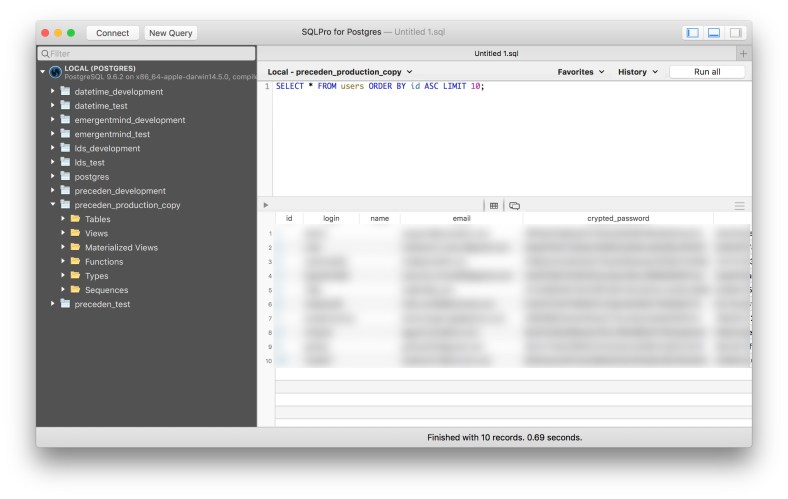
Here’s what the UI looks like along with an example query to display the first 10 people to sign up:

sqlpro-for-postgres.jpg

In future posts we’ll see how to query Postgres with R to analyze the data and gain insights about how people use our products.

If you’re interested in learning more, sign up for my new Data Science for Product Analytics newsletter to get notified when there are new posts.

Update: check out the follow up post, How to Schedule Cloning your Heroku Postgres Database Locally.

A Simple CROSS JOIN Example

99% of the queries I write to join tables wind up using JOIN (aka INNER JOIN) or LEFT JOIN so whenever there’s an opportunity to use one the other types, I get pretty excited 🙂. Today, that wound up being a CROSS JOIN.

Consider the following table containing charges:


DROP TABLE IF EXISTS charges;
CREATE TABLE charges (id INT PRIMARY KEY AUTO_INCREMENT, amount DECIMAL(10,2));
INSERT INTO charges (amount) VALUES (18);
INSERT INTO charges (amount) VALUES (15);
INSERT INTO charges (amount) VALUES (27);
+—-+——–+
| id | amount |
+—-+——–+
| 1 | 18.00 |
| 2 | 15.00 |
| 3 | 27.00 |
+—-+——–+

view raw

Charges.txt

hosted with ❤ by GitHub

How would you add add a column showing how much each charge represents as a percentage of the total charges?

Option 1: Using a subquery

One way to solve this is to use a subquery:


SELECT *, ROUND(amount / (SELECT SUM(amount) FROM charges) * 100) AS percent
FROM charges
+—-+——–+———+
| id | amount | percent |
+—-+——–+———+
| 1 | 18.00 | 30 |
| 2 | 15.00 | 25 |
| 3 | 27.00 | 45 |
+—-+——–+———+

view raw

gistfile1.txt

hosted with ❤ by GitHub

For each record, we divide the amount by the sum of all the amounts to get the percentage.

Option 2: Using a variable

Similar to the solution above, except here we save the sum of the amounts in a variable and then use that variable in the query:


SET @total := (SELECT SUM(amount) FROM charges);
SELECT *, ROUND(amount / @total * 100) AS percent
FROM charges;
+—-+——–+———+
| id | amount | percent |
+—-+——–+———+
| 1 | 18.00 | 30 |
| 2 | 15.00 | 25 |
| 3 | 27.00 | 45 |
+—-+——–+———+

view raw

gistfile1.txt

hosted with ❤ by GitHub

Option 3: Using CROSS JOIN

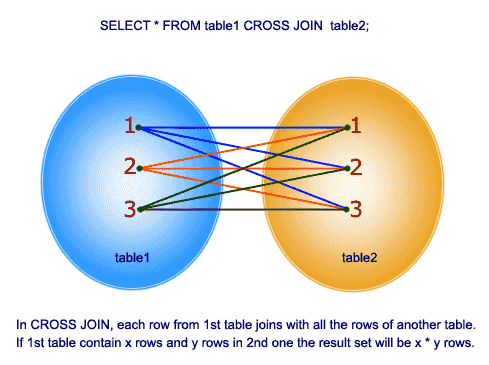
A cross join takes every row from the first table and joins it on every row in the second table. From w3resource.com:

cross-join-round.png

In this solution, we create a result set with one value (the sum of the amounts) and then cross join the charges table on it. That will add the total to each record, which we can then divide the amount by to get the percentage:


SELECT *, ROUND(amount / total * 100) AS percent
FROM charges
CROSS JOIN (SELECT SUM(amount) AS total FROM charges) t;
+—-+——–+——-+———+
| id | amount | total | percent |
+—-+——–+——-+———+
| 1 | 18.00 | 60.00 | 30 |
| 2 | 15.00 | 60.00 | 25 |
| 3 | 27.00 | 60.00 | 45 |
+—-+——–+——-+———+

view raw

gistfile1.txt

hosted with ❤ by GitHub

If we didn’t want the total column in the result, we could simply exclude it:


SELECT id, amount, ROUND(amount / total * 100) AS percent
FROM charges
CROSS JOIN (SELECT SUM(amount) AS total FROM charges) t;
+—-+——–+———+
| id | amount | percent |
+—-+——–+———+
| 1 | 18.00 | 30 |
| 2 | 15.00 | 25 |
| 3 | 27.00 | 45 |
+—-+——–+———+

view raw

gistfile1.txt

hosted with ❤ by GitHub

In this case there shouldn’t be any performance gains using the CROSS JOIN vs one of the other methods, but I find it more elegant than the subquery or variable solutions.

CROSS JOIN vs INNER JOIN

Note that CROSS JOIN and INNER JOIN do the same thing, it’s just that because we’re not joining on a specific column, the convention is to use CROSS JOIN. For example, this produces the same result as the last CROSS JOIN example:


SELECT id, amount, ROUND(amount / total * 100) AS percent
FROM charges
INNER JOIN (SELECT SUM(amount) AS total FROM charges) t;
+—-+——–+———+
| id | amount | percent |
+—-+——–+———+
| 1 | 18.00 | 30 |
| 2 | 15.00 | 25 |
| 3 | 27.00 | 45 |
+—-+——–+———+

And so does this:


SELECT id, amount, ROUND(amount / total * 100) AS percent
FROM charges, (SELECT SUM(amount) AS total FROM charges) t;
+—-+——–+———+
| id | amount | percent |
+—-+——–+———+
| 1 | 18.00 | 30 |
| 2 | 15.00 | 25 |
| 3 | 27.00 | 45 |
+—-+——–+———+

view raw

gistfile1.txt

hosted with ❤ by GitHub

So why use CROSS JOIN at all? Per a Stack Overflow thread:

Using CROSS JOIN vs (INNER) JOIN vs comma

The common convention is:

* Use CROSS JOIN when and only when you don’t compare columns between tables. That suggests that the lack of comparisons was intentional.
* Use (INNER) JOIN with ON when and only when you have comparisons between tables (plus possibly other comparisons).
* Don’t use comma.

Props this Stack Overflow question for the tip about using CROSS JOIN to solve this type of problem.