AdWords: Week 1 Results

Last Sunday I started advertising Preceden via Google AdWords. I’ve played around with it before, but never seriously.

I wrote a few ads, picked a bunch of timeline-maker keywords to target, set my daily budget to $3 (and a day or two later $10) and flipped the switch.

Week 1 Results

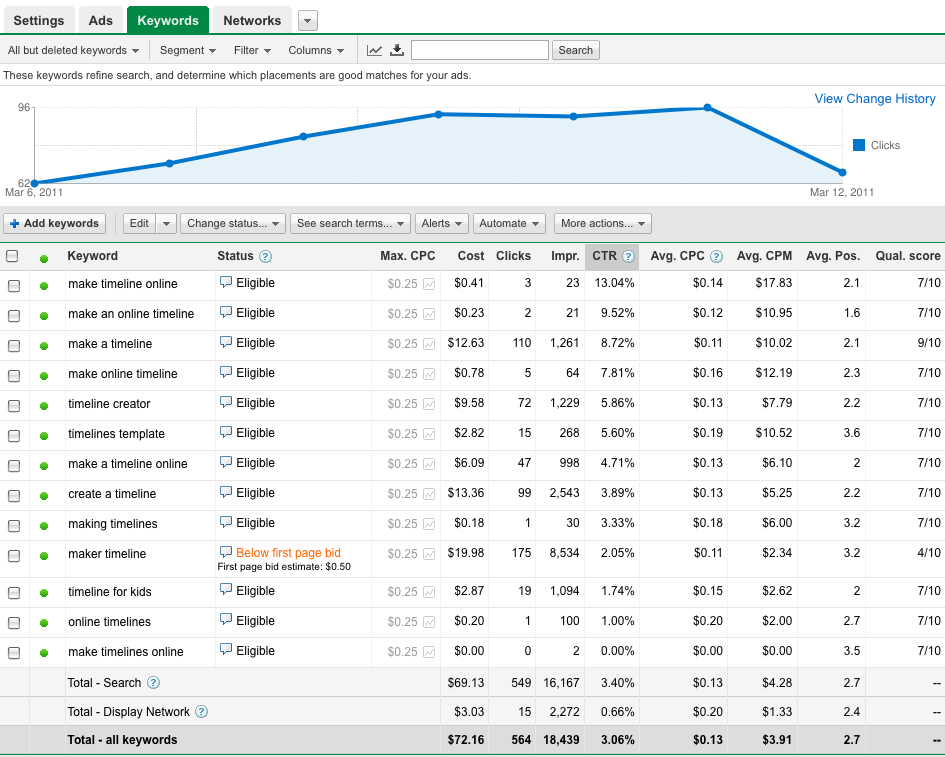
Impressions: 18,439

Clicks: 564 (3.06%)

Visitors: 548

CPC: $0.13

Cost = $72.16

Sign Ups: 3

Revenue: $87

Profit: $14.84 (21% ROI)

Thoughts

The variance of this whole process is extremely high. 3/548 is a 0.54% conversion rate. Good, bad… I don’t know. It seems bad, but I don’t really have a lot to compare it to.

The good news is that the campaign made money. Not much, but something. Had 2 people upgraded instead of 3, it would have lost money (-20% ROI). Had one additional person signed up, the return would be exceptional (61% ROI). This whole thing makes you appreciate how small improvements to your site, which in turn might convince a few more people to upgrade, can make a huge difference to your bottom line.

Next steps: Refine A/B tests, bump daily budget to $30, and see what happens.

Here are the keyword details:

How to Calculate Your AdWords ROI for a Freemium, One Time Purchase Web App

I run a web-based timeline tool called Preceden and am about to start experimenting with AdWords to bring in traffic. What kind of ROI can I expect given my current conversion rates and price?

Let:

s = Conversion rate representing how many new visitors sign up for a free account

u = Conversion rate representing how many free account holders upgrade to a paid account

p = The price of the web app

c = The average Cost Per Click (CPC) for our AdWords campaign

For example, let’s say our CPC is $0.25, 25% of the new visitors sign up for an account, 4% upgrade to a paid account, and upgrading costs $29 (which is roughly my situation with Preceden, give or take).

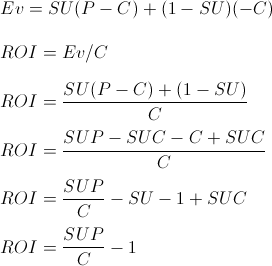
First, we’ll calculate the Expected Value for a single user. If 25% of the visitors sign up for a free account, and 4% upgrade to a paid account, the overall conversion rate is 1%. So 1% of the time a visitor signs up and upgrades to a paid account and we make $29 minus the cost of AdWords ($0.25). The other 99% of the time the user doesn’t sign up or doesn’t upgrade their account and we lose the $0.25.  The Expected Value then is 1% * $28.75 + 99% * -$0.25 = $0.04. In other words, we can expect to make about 4 cents per AdWords visitor.

Our ROI is the Expected Value ($0.04) divided by the cost ($0.25) or 16%.

If these numbers are correct, then if we spend $100 on AdWords, we can expect to make $116. If we spend $1,000 we can expect to make $1160. And so on.

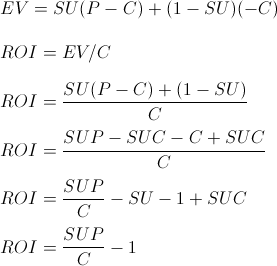
The last line simplifies it all a bit. The implications make intuitive sense: if we increase the conversion rates or the price, we can expect to make more money. If we decrease the CPC, we also make more money. Likewise, if we want to double our ROI we can either double the price ($29 to $58), half the CPC ($0.25 to $0.125), or double the conversion rate (1% to 2%). Which of the three do you think is the easiest to do?

###

Over the next few months I’m going to work on measuring and optimizing Preceden’s ROI with eye towards maximizing its profits. I’ll provide regular updates — stay tuned.

February in Review: Life Tracking, Major jMockups Updates, and Preceden’s Best Month Yet

In December I announced a $4K/month challenge, where I try to reach $4K/month in profit from my web apps by the end of 2011.

In this post I’ll give an overview of what happened in February. Click here to see January’s report.

By the numbers:

1) According to RescueTime, I spent 121 hours working over the course of the month, which equals about 30 hours/week or 4.3 hours/day. (Not including day job.)

2) 10,578 people visited Preceden. 529 people signed up for an account. 20 people upgraded to a paid account. Revenue: $580. Total time spent working on Preceden: 0 hours.

3) 5,303 people visited jMockups. 302 people signed up for an account. None upgraded. Revenue: $19.

4) 9 blog posts:

Three on this blog:

jMockups and Preceden January Review – 5 Feb

Seeking Alpha Testers for jMockups Import Tool (cross post from the jMockups Blog) – 6 Feb

Launch! jMockups Website to Mockup Converter – 19 Feb

Five on the jMockups Blog:

New Keyboard Shortcuts to Make Designing Mockups Easier – 3 Feb

Seeking Alpha Testers for new jMockups Import Tool – 6 Feb

New Homepage Design, Some A/B Testing, and Why Data Can Be Misleading – 11 Feb

Website to Mockup Converter Launched – 19 Feb

Reengineering jMockups for Optimal Performance – 26 Feb

And one as a guest post on Sebastian Marshall’s blog:

Nine Tips for Getting Started with Life Tracking

Overview:

In terms of progress, February was a huge month for jMockups. For a good chunk of December, January, and early February, I was busily building and preparing for the launch of the Website to Mockup converter. The official launch was on Saturday, 19 Feb while I was in NYC with Chris Conley and Mike Nicholaides. All in all, it went fairly smoothly, though there were some issues rooted in the slowness of the jMockups editor. The week following the launch I reengineered the editor to eliminate the performance issues. Today was another huge update: the launch of the redesigned mockup editor. In a nutshell, compared to a month ago jMockups has a sexier design, an improved user interface, vastly improved performance, and one major new feature: the Website to Mockup converter.

Meanwhile, Preceden had its best month yet. 20 paid signups resulting in almost $600 in revenue. Long term I believe that jMockups has much more potential than Preceden, yet it’s a little unnerving that the thing I’m spending so much time on is hardly making any money and the thing I’ve ignored for the last seven months is growing and bringing in decent revenue. Rather than spend 100% of my time on jMockups and none on Preceden, I’m going to aim for a 85/15 ratio in the future. I keep saying it, but a few A/B tests, SEO, and target AdWords campaigns could have a huge affect on Preceden’s revenue so it’s time to start doing something about it.

Finally, I’ve been doing life tracking for 2+ months now and have had some great results from it. Tracking + slow, incremental improvements go a long, long way. Check out my post on Sebastian’s blog for more details.

One last thing: I really enjoy talking with folks about their startups and poker bot work, so if there’s anything I can help you with or you just want to say hey, please shoot me an email.

Thanks for reading — Matt

Launch! jMockups Website to Mockup Converter

Today is the official launch of the new jMockups Website to Mockup Converter, which lets you import any existing webpage into jMockups, allowing you to redesign and share it in minutes.

You can check it out here: Website to Mockup Converter.

And here’s the video demo:

Saturday probably isn’t the ideal day to publicly launch a new feature, but I’m in NYC this weekend with Chris Conley and Mike Nichoaides, two talented developers I originally met through some Philly on Rails meetups a while back. What better time to launch than among friends who have been following my progress and helping me since jMockups’ inception?

In the past I probably would have posted it on HackerNews minutes after I pushed it out to the site for people to start using. The problem doing it that way is that without a lot of people testing it beforehand, you run the risk of discovering major bugs in the midst of getting a lot of traffic. Then you have to choose between trying to fix it immediately (which due to your haste can introduce other bugs) or waiting for the traffic to die down (in which case a lot of people might have already experienced the bug). This has happened to me more times than I’d like to admit.

With this launch, I made it available to a few folks last weekend, then about half the existing user base on Wednesday. And sure enough, there were a lot of issues that I hadn’t anticipated. For example, when you work with bookmarklets you need to make sure that you prevent the browser from caching the code:

http://www.jmockups.com/javascripts/bookmarklet.js?x=’+(Math.random())

I wasn’t doing that a week ago and so I was making changes to the bookmarklet code but users weren’t getting the updates because their browser had cached the original version. Thankfully only a handful of people had tested it at that point. Imagine if several hundred had: most of them would never get the updated versions of the file, forever forcing them to use the original version of the bookmarklet. Not good.

By launching it in stages I identified issues like that and resolved them prior to the influx of traffic, making this a much less stressful day than previous launch days have been. Knock on wood…

Anyway, dear reader, I’d love to get your thoughts on the new Website to Mockup tool. Feel free to email me or leave a comment below. Thanks!