
Automattic is hiring a Marketing Data Analyst

We’re now accepting applications for a new Marketing Data Analyst position at Automattic that might interest some of you:

https://automattic.com/work-with-us/marketing-data-analyst/

In this role you’d be helping us use data and analytics to guide the direction of our marketing efforts on WordPress.com.

Here’s the official description:

Automattic is looking for a data analyst to join the marketing team. You will distill data into actionable insights to guide our customer marketing and retention strategy as well as inform product development efforts.

Primary responsibilities include:

  • Build and maintain standardized reporting on key metrics across the customer lifecycle.
  • Develop customer segmentation models to inform tailored, multi-channel marketing strategies.
  • Conduct ad hoc analyses to better understand customer behavior, needs, and individual test results.
  • Partner with other analysts and developers to increase data accessibility across the organization.
  • Design a process for prioritizing and communicating data requests and priorities.

You:

  • Are proficient in SQL and Excel.
  • Have experience with web analytics platforms such as: Google Analytics, KISSmetrics, or Mixpanel.
  • Have experience working with marketing teams to deliver analyses and answer business questions.
  • Are able to communicate data in a way that is easy to understand and presents clear recommendations.
  • Are highly collaborative and experienced in working with business owners, executives, developers and creatives to discuss data, strategy and tests.
  • Have excellent prioritization and communication skills.
  • Ideally, have web development experience (though not required).

Like all positions at Automattic, you’ll work remotely, and can be based wherever you live. It’s not a requirement that you live in or relocate to the Bay Area to do this job.

If this sounds interesting to you (and how could it not?!?) there are instructions at the bottom of the job description about how to apply.

And if you have any questions about Automattic or this data analyst position, feel free to drop me an email: mhmazur@automattic.com.
 

Visualizing Your SaaS Plan Cancellation Curves

If you work on a SaaS product, you probably have a good idea of what its cancellation rates are, but chances are you don’t know how that changes over time. For example, what % of users cancel after 1 day? How about after 7 days, 30 days, etc?

I worked on a project at Automattic this week to help us understand the cancellation curves for WordPress.com’s plans and am open sourcing the R script so anyone can do the same for their service.

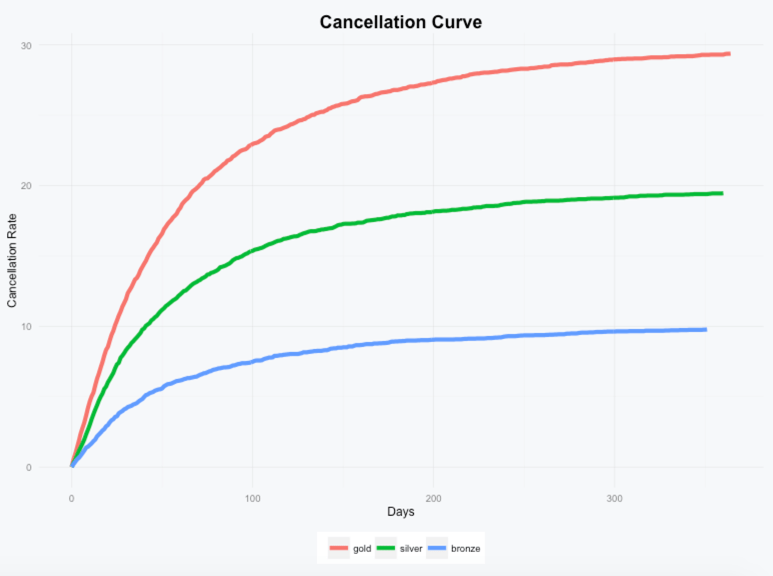
Here’s an example of how the cancellation curves might look for a service with a Gold, Silver, and Bronze plan:

example.png

We can see that most users who cancel do so pretty quickly and that long term about 30% of Gold plan, 20% of Silver plan, and 10% of Bronze plan subscriptions wind up cancelled.

To generate this data for your own product, you’ll just need three data points for each subscription: when it was purchased, when it was cancelled (if it was), and the name of the subscription. The script will take care of analyzing the data and generating the visualization.

You can check out the script and additional details on GitHub here: Cancellation Curve Visualizer.

If you have any questions or run into any issues, don’t hesitate to drop me a note.

The impact of GoDaddy’s 5-year default domain registration option

Andrew Allemann has a great post on Domain Name Wire where he tries to estimate the impact of GoDaddy’s five-year default domain name registration option.

GoDaddy’s shopping cart defaults to a five-year registration period when you place a domain name in your cart. Most people switch this back to just one year, but some don’t. Whether they merely overlook this or decide it makes sense to register the domain name for five years, about 3.5% of new .com registrations at GoDaddy each month are for five years.

Here’s a summary of the math:

  • In June, the .com registry reflects 26,750 five-year registrations which account for 3.48% of all their .com registrations so 26,750/.0348 = 769K total.
  • On average across all registries, only 1.66% of of new .com registrations are for 5 years.
  • Had GoDaddy met the average, it would have only registered 769K * 1.66% = ~12,750 five year registrations.
  • That works out to be a difference of 26,750 – 12,750 = 14K five year registrations or 14K * 5 = 70K years of registrations.
  • Assuming those users would have purchased 1 year registrations if 5 wasn’t the default, that works out to be 70K – 14K = 56K extra years of registrations per month thanks to that five-year default.

Regardless of how you feel about GoDaddy, you’ve got to admit that they’re really effective at upselling.

Hattip to my coworker Wendy for sharing the post.

The Meta Funnel: From User Activity to Product Changes

When we think about funnels, we tend to think about how users move through our product: what percentage of people who visit our homepage sign up, what percentage of those users pay, etc.

If we zoom out, there’s another even more important funnel that we can use to measure how sophisticated an organization is with its data:

User Activity → Data → Analysis → Insights → Product Changes

User Activity → Data: When users interact with your product, are you capturing the relevant data related to their activity? For example, you might track how many people visit your homepage, but how about what percentage scroll below the fold, where they click on the page that they shouldn’t be, the bounce rate, how they’re getting to your site and how that’s changing over time, etc. What’s important to track will vary by product and not everything you track will be important, but if you’re not recording the data, it will be impossible to analyze it.

Data → Analysis: You have data, but is anyone looking at that data regularly? All of the data in the world doesn’t matter if no one ever analyzes it. For some types of analysis your analytics tools will make this step easy, but it also might require complex queries or scripts depending on what questions you’re trying to answer.

Analysis → Insights: One of the hardest things about analytics is that it’s often difficult to look at all of the numbers and draw actionable insights from them. You may discover that your conversion rate is 15%, but is that good or bad? If it goes up to 20% is that because your product has improved or just because the quality of your traffic has changed. If the top term your users are searching for on your support page is “domains”, is that an indication that you need to improve the instructions you provide users in your product, or just an inevitable result of domains being very complex?

Insights → Product Changes: And finally, once you have insights from the analysis you’ve done, are you making any changes to your product as a result? Maybe insights into your product’s support search terms indicate that you do need to improve the guidance you provide to users within your product. Does your team then execute on that by actually improving the guidance within your product?

In my experience with both many years of side projects and at work, the conversion rate across this entire funnel is typically very low. Part of it is just the nature of the beast: it’s hard to set up tracking to collect everything that’s important, it’s hard to analyze the data you do collect, it’s hard to come up with insights from that analysis, and it’s hard to make changes to your product when you do have those insights.

But just because it’s hard doesn’t mean it’s not worth optimizing. If you can double your organization’s conversion rate between any of these steps, it should double the number of improvements you wind up making to your product as a result.

One thing that can help is to discuss with your team and document your organization’s processes for each of these steps. Things like:

  • Who is responsible for implementing analytics on your team?
  • If they don’t have experience setting it up, where can they go to learn?
  • Where can they go to learn what data is important to collect?
  • How do they analyze the data?
  • How do you ensure people are looking at the data often enough?
  • Can you automate the reporting? Should you?
  • Who on the team needs to be involved to maximize the number of insights you’re discovering from your analysis?
  • What does your process look like for turning those insights into actual product changes?

There’s probably a lot of low hanging fruit here for your team to work on. The better your team gets at moving down this funnel, the more improvements you’ll make to your product leading to happier users and more impact on your company’s bottom line.