How I Use TextExpander

One of my favorite Mac apps is TextExpander, a toolthat saves you time by enabling you to create shortcuts for things you type frequently.

For example, here are the shortcuts I use on a regular basis:

  • Typing mm@ expands to my email address, matthew.h.mazur@gmail.com.

  • Typing vcc expands to my Visa credit card number.

  • Typing stcc expands to a Stripe test credit card number, 4242424242424242.

  • Typing jscc expands into a JSDoc template:

/**
 * Description
 *
 * @param {Object} var - Description
 * @returns {Boolean} Description
 */
  • Typing wpcc expands into a PHPDoc template:
/**
 * Description
 * 
 * @param int|string $var Description
 * @return bool Description
 */
  • And last but not least, ---> expands into because using ASCII arrows makes you look like a badass hacker, obviously.

Give it a shot if you’re not already using it. There’s a free trial and you can purchase the full version for $44.95.

If you have any recommendations for other useful productivity tools like TextExpander, I’d love to check them out. Thanks!

My iPhone Homescreen

homescreen.png

In order:

  • Messages
  • Clock
  • Workflowy – for taking and referencing notes
  • Camera+ – for taking fancy photos
  • Photos
  • Google Calendar – for managing my calendar
  • HackerNews – I use this one by Dharmesh Patel mainly because it supports collapsing nested comments
  • Pandora – for music
  • Google Maps – for not getting lost
  • iReddit – for wasting time
  • Facebook
  • Instagram – for sharing photos of random things
  • Settings
  • 1Password – for managing passwords
  • Facebook Messenger
  • Feedly – for catching up on blogs that I follow
  • Overcast – for listening to The Tim Ferriss Podcast
  • Orangetheory – for scheduling classes at my gym
  • Product Hunt – for learning about new product launches
  • Coach.me – I’ll probably move this off soon because despite repeated attempts to stick to it, I never do. (It’s a service that lets you build and track daily habits.)
  • Phone
  • GMail
  • Safari
  • Music

If you have any recommendations for better alternatives to any of these please drop me a note.

How to track your site’s search engine rankings

One thing I’d highly recommend to anyone with a website is to track your site’s search engine rankings for its key search terms. For sites that rely heavily on search traffic you’ll often find that the amount of traffic your site receives is directly related to where it ranks for its top search terms. It will also give you a sense of what terms you should optimize for which can play a major role in your site’s long term growth roadmap.

In this post I’ll show how I track rankings and combine that with data about how much traffic each term drives to determine which terms are important for my sites.

Tracking keyword rankings

I previously used SEOmoz (now just called Moz) to help track keyword rankings, but found that I was only using it for that and none of its other features. At $99/month for their cheapest plan, that was a bit much for my bootstrapper ways.

I did a little research and discovered SERPfox, a lightweight search engine rank tracker. (SERP stands for Search Engine Result Page.) At $10/month for 50 keywords, it’s hard to beat.

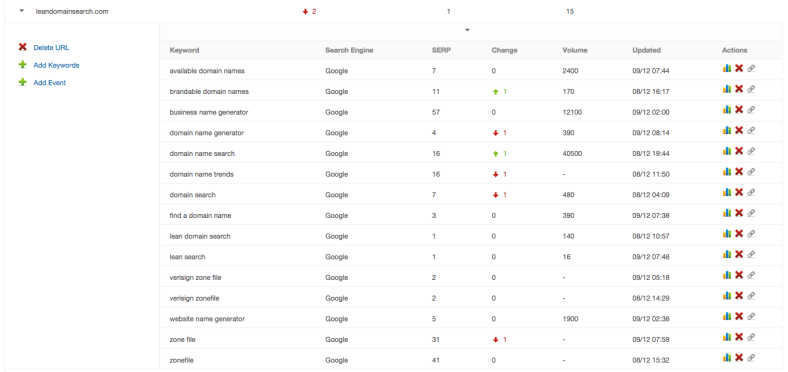
Here’s what I track for Lean Domain Search:
Screen Shot 2015-12-09 at 9.12.02 AM.png

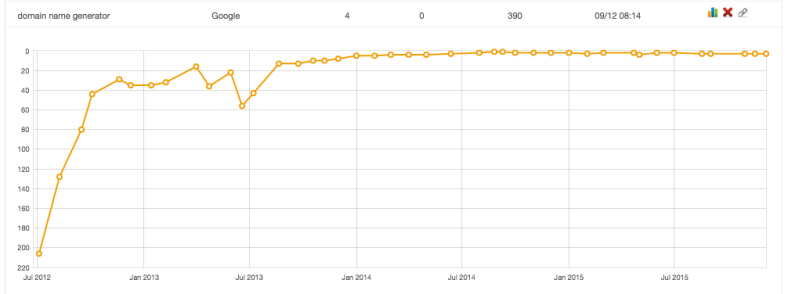
You can also view a chart showing its position for each keyword over time:
Screen Shot 2015-12-09 at 9.30.30 AM.png

Not all of the terms I track drive a lot of traffic, but it’s interesting to me to know where it ranks for terms like zonefile just for my awareness.

On that note, the time to start tracking keywords is ideally before you launchIt should be on your pre-launch checklist to set up keyword tracking because it’s most valuable when you can see the long term trends.

One other benefit to tracking rankings is that if your site’s traffic suddenly spikes or takes a nose dive, you can check your rankings to see if Google recently tweaked their algorithms and caused a major change in your rankings.

Adding volume into the mix

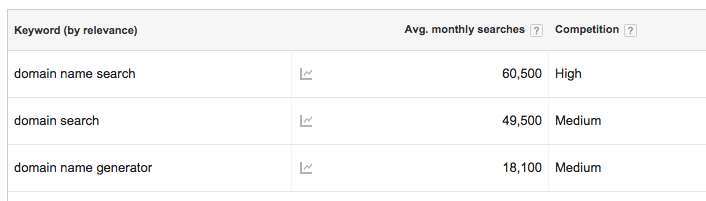
I’ve never had any issues with SERPfox’s reported rankings (searching Google in incognito mode always matches SERPfox’s reported rankings), but the volume they report doesn’t seem right. For example, it reports that domain name search has a monthly search volume of 40,500 and domain search 480, but Google Keyword Planner tells a different story:
Screen Shot 2015-12-09 at 9.24.45 AM.png

Google Webmaster Tools provides additional data for your consideration as well. It has Lean Domain Search’s top clicked keyword as domain name generator (1,702 clicks in the last 30 days), domain search is the tenth most clicked (112 clicks), and domain name search is the 38th most clicked (19 clicks). Piecing these together it kind of makes sense:

Screen Shot 2015-12-09 at 9.42.20 AM.png

domain name generator gets fewer searches, but Lean Domain Search ranks well for it so it drives a lot of clicks. domain name search gets the most searches, but Lean Domain Search is on the second page of results so it doesn’t get many clicks. domain search also gets a lot of searches, but because Lean Domain Search is #7 not as many people wind up clicking on it.

I’m coming for you, Instant Domain Search 😄 (currently #1 for both domain search and domain name search).

If you have any recommendations for other tools that piece all of this together, I’d love to check them out – let me know. Thanks!

The Little, Brown Book of Anecdotes

Screen Shot 2015-12-06 at 2.05.37 PM.png
One of my favorite things to read is The Little, Brown Book of Anecdotes by Clifton Fadiman. The book contains over 4,000 anecdotes by more than 2,000 famous people.

Here are a few examples:

A devotee of cigars, Mark Twain was temptuous of those who made a great to-do about giving up smoking. He always claimed that it was easy to quit: “I’ve done it a hundred times!”

Henry Ford was once asked why he made a habit of visiting his executives when problems arose rather than calling them to his own office. “I go them to save time,” explained Ford. “I’ve found that I can leave the other fellow’s office a lot quicker than I can get him to leave mine.”

On arrival at a Chicago hotel, Thomas Du Pont found that a lady who had previously occupied his room had left behind a frilly nightgown. He summoned the manager, handed him the garmet, and instructed, “Fill it and bring it back.”

If you decide to buy it I recommend the Kindle edition simply because the paperback edition is massive. I also recommend not trying to read it straight through; I enjoy flipping it open to a random page and to just start reading regardless of whether I’ve heard of the person or not because it exposes me to a lot of history that I probably would never learn about otherwise.

As one of the Amazon reviewers commentedI envy you if you are discovering this for the first time. Check it out.