Strategizing with Google’s Keyword Tool

Unregistered Domain Names

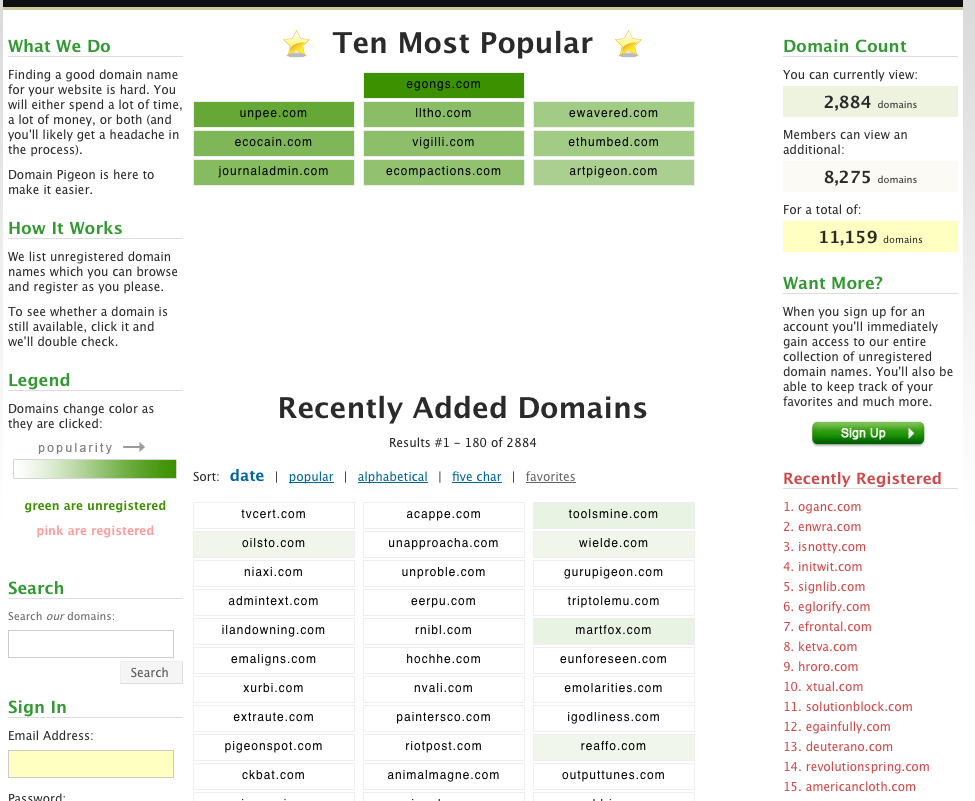
Below is a current screen shot of Domain Pigeon. How many times do you count the word “unregistered”?
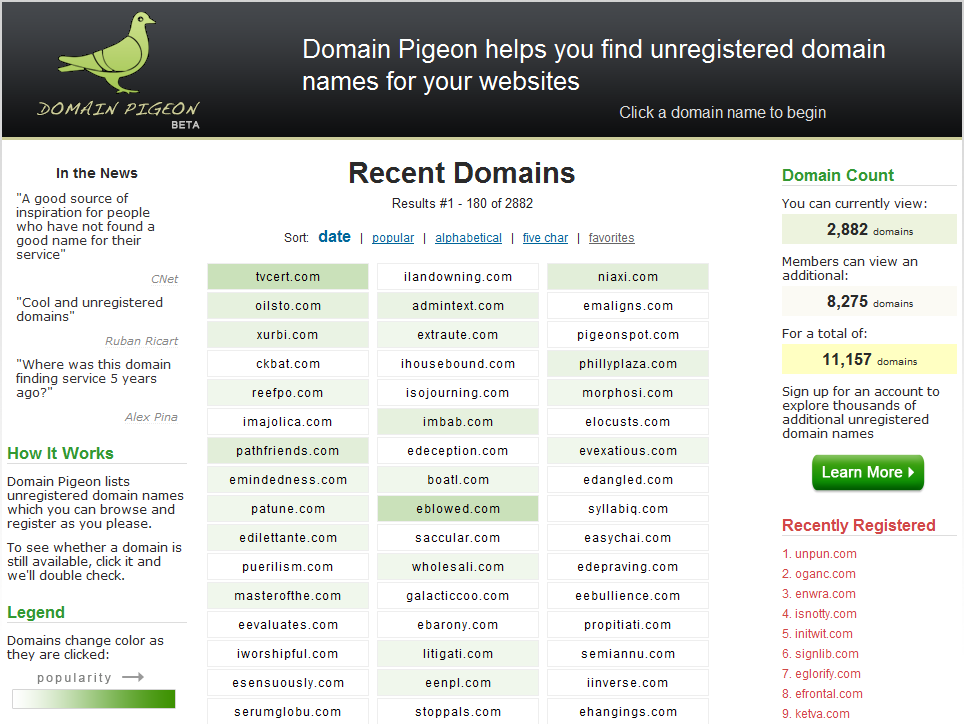
Four times: once in the header, once in a quote, and once under How it Works, and once under Domain Count. It also occurs again in the legend, which you can’t see, and once in the page’s title for a total of six times.

This was done somewhat intentionally in an attempt to improve Domain Pigeon’s standing in Google’s search results.  My hope was that one day Domain Pigeon would be the #1 result for people searching for unregistered domain names. After all, this would help direct a lot of traffic to the site, right?

As I would soon figure out, no, it wouldn’t.

Unregistered Available Domain Names

How many people are actually looking for unregistered domain names? I would have guessed a lot.  After all, thousands of people are looking for domain names so it would seem to make sense that people are also looking for innovative ways to find unregistered domain names as well.

In order to find out for sure, I turned to Google’s Keyword Tool, which helps people research the popularity of various search terms. It’s incredibly easy to use:

1) Once you’ve brought up the Keyword Tool, type in a bunch of phrases related to the content of your site. I searched for domains, unregistered domain names, unregistered domains, available domains, and available domain names.

2) Check “Use Synonyms” and hit search. Google will then intelligently spit out a list of related search terms and numbers reflecting their competitiveness and search volume.

3) At this point, you can simply sort the results in your browser or download the results in order to do a more advanced analysis.

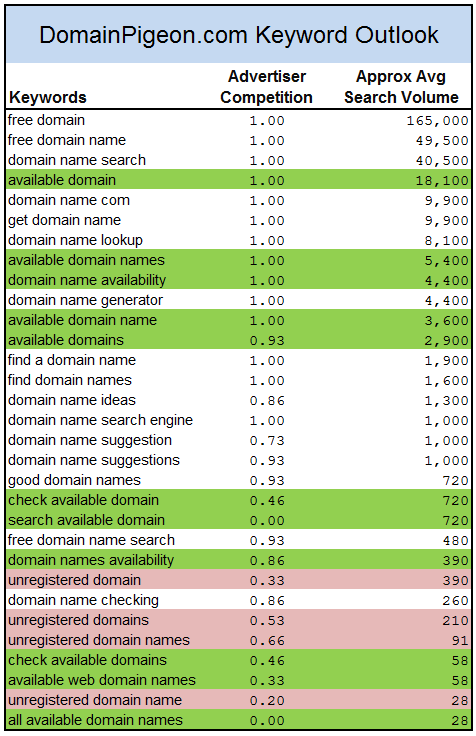
I chose to export them to an Excel file. If you go this route, you’ll likely need to repeat the following process twice, one for the first set of results (“Keywords related to terms entered”) and one for the second set of results (“Additional keywords to consider”).  Next, I combined these two lists into one by copying and pasting the data into a single sheet, then sorted them by Average Search Volume. This process resulted in about 350 search terms, which I then went through and filtered based on phases that apply to Domain Pigeon. I highlighted the phrases that contain the word “available” in green and the ones with “unregistered” in pink in order to make the comparison clear.
The results shocked me.

People aren’t searching for unregistered domain names; they’re searching for available domain names. While they mean the same thing, it turns out most people don’t actually use the word “unregistered”. It seemed natural to me to say “unregistered domain names” when people asked what Domain Pigeon was about so I used that phrase throughout the site, but most non-techies, who make up a much larger audience, would never say it that way. They are looking for “available domain names”.

If you just compare the volume for those two phases, without counting the related ones, “available” is about a 60:1 favorite. What a difference a word makes.

Now what?

You can use this information to profitably adjust how you market your website, but be careful. The middle column, Advertiser Competition, reflects how many people you’re competing against for Google’s AdWords program but is also probably a good indication of how many competitors you have. If your goal is to purchase advertisements, you’re going to have a much harder time than if you just want to adjust the wording on your site. Also, somewhat ironically, rewording your site may actually decrease your traffic because of the increased competition you’re going to face with a more popular search term.

In the case of Domain Pigeon, changing the word “unregistered” to “available” may make a big difference in the long run, especially when I add a blog and start producing content. Yes, it may wind up being more difficult reach one of the top search results, but hey, let’s see what happens.

Lesson Learned: Profit from Google’s Keyword Tool
Improving Domain Pigeon’s Two Most Important Pages

It’s been a busy productive day. Most of my effort was focused on improving the homepage and the registration page.

Homepage before:

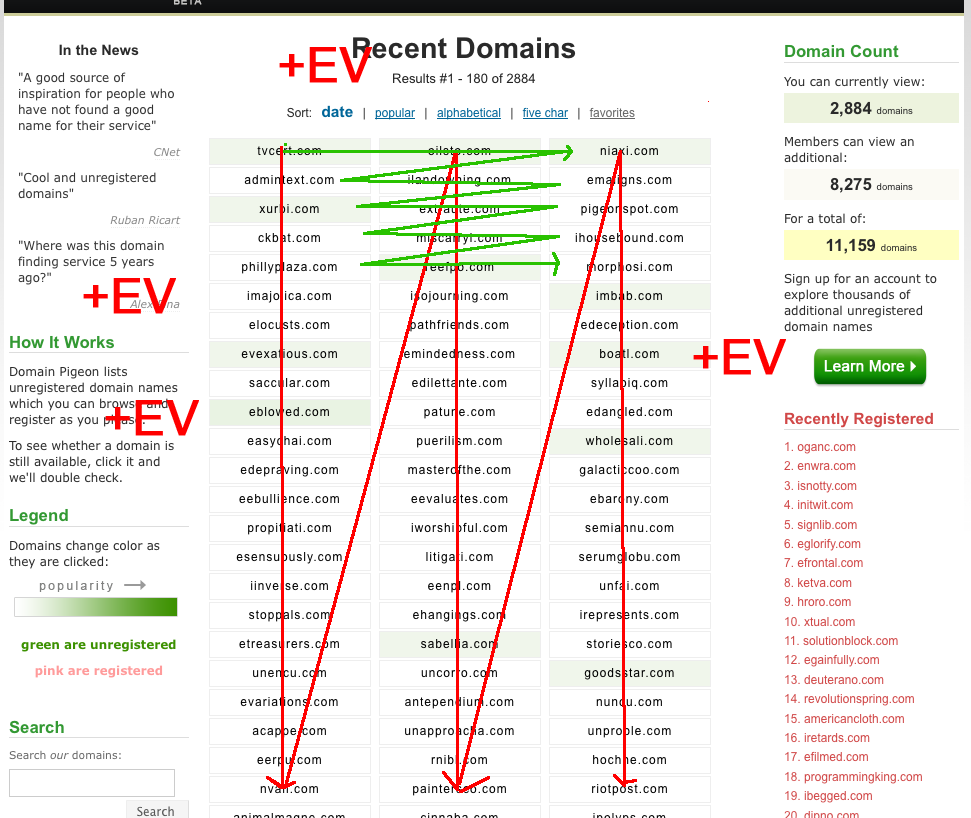
Homepage After (with markups):

  1. Previously, the domains were added onto the list vertically. So, for example, if you searched for “ninja” and it returned six names, all six would appear in the first column, one after the other. With six, it doesn’t look so bad, but sometimes it spills over into the second column. You might have the first column filled with 60 names, the second with 5, and the third with zero. It looked bad and it was especially hard to tell with the recently added names which were the most recent. Now, the domains are added horizontally, so that the second domain appears in Row 1, Column 2, the third in Row 1, Column 3, the fourth in Row 2, Column 1, etc.
  2. Combined the Who we Are and How it Works sections. Too much extra info, plus “headache” is not a word you should include on the homepage, even if you’re saying you’re the cure.
  3. Added In the News. Domain Pigeon has received a bit of attention the last several days and I’m seizing the opportunity to promote the site (+EV). CNet is at the top, as it is the the source with the most name recognition. After that is a short quote from Ruban Ricart of Frusketing.com and Alex Pina via Twitter. I considered putting “Frusketing” instead of Ruban Ricart and “Twitter” instead of Alex Pina, but it seemed dishonest to imply that Twitter, the company, had made the comment. I didn’t include Frusketing because it looks too much like Frustrating which is opposite of the impression (similar to omitting the word “headache”). Ryan’s article was kind of hard to pull a good quote directly from so I started off by doing some clever parsing (like “Domain Pigeon [..] is a [..] great site”), but it also seemed too dishonest (-EV) so I just went with something short and sweet.
  4. Removed Top 10 Domains. Simply put, they weren’t going anywhere. Unpee.com had been in the Top 10 for the past two days probably more because it was funny than because it was a good domain name. The Top 10 was important when the site wasn’t getting much traffic because it was a quick overview of what other visitors were doing and it was colorful, but now that the coloring algorithm has been adjusted and the site is getting more traffic, its not as important. Also, the two inches of white space below that section (which kept the dropdowns smooth), no longer has to be there. That’s valuable real estate and it was being wasted.
  5. Removed Want more? Too much no valued added fluff. I took the important parts (“You should sign up”) and added it to the bottom of the Domain Count section.
  6. Removed the Sign Up button and replaced it with Learn More. The words “Learn More” are a lot more inviting than “Sign Up”, aren’t they? Also, I doubled its size to encourage people to proceed to the registration page (+EV).
  7. The paragraphs on the side columns are now Verdana instead of the Lucille Sans or whatever it was before. It’s a nice contrast, though I’m slightly worried about branding.
  8. Renamed Recently Added Domains to Recent Domains — again, the more white space the better.
  9. When you search for a domain using the .com Checker you now have the option of quickly registering it using one of the affiliate links (+EV).

I also did a lot of work on the registration page, as it was not exactly something to be proud of.

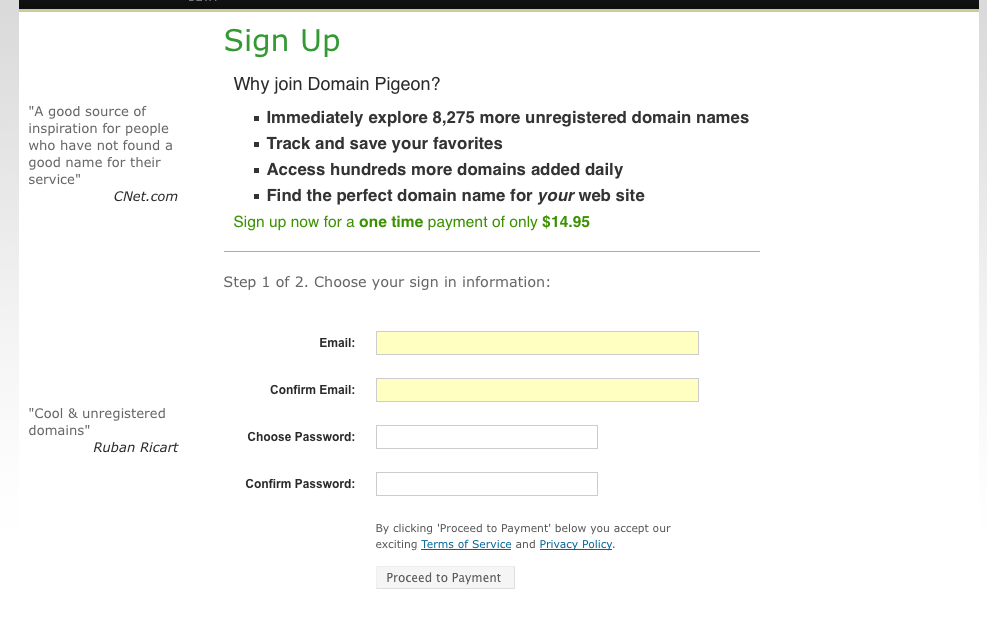
Registration Page Before:

This is almost identical to how it looked on the launch day with the exception of the quotes and some minor wording changes which I did yesterday.

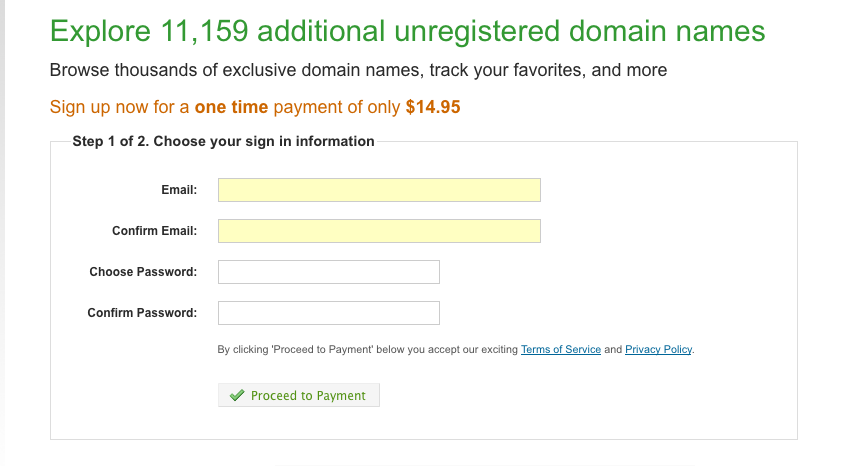
Registration Page After:

The major problem was that I was trying to fit everything within the center column without using either of the side columns. This forced me to use unnatural, awkward wording.

Expanding it so that I used the entire page allowed for a lot of extra flexibility.  WordPress’s registration page was my inspiration for the current look. Also, that little button is thanks to an excellent tutorial by Kevin Hale on how to take advantage of the neglected <button> element.

It’s impossible to say how these small changes would have ffected the registration rate the past few days, but I think its fair to say that it only could have helped.

As always, if you have any suggestions for Domain Pigeon please don’t hestitate to email me at matthew.h.mazur@gmail.com.

Domain Pigeon Title

Yesterday I received a helpful email from a fellow developer, who suggested that I change Domain Pigeon’s header:

In regards to the text in domain pigeon’s header

Domain Pigeon helps you find unregistered domain names for your websites”

is far superior to

Domain Pigeon helps you find an unregistered domain name for your websites”

First, the former reads better and as a bonus it implies registering multiple domains through your service.  The biggest difference though is that the former implies that your service is more useful (you can help me find MULTIPLE domains, wow) whereas the latter gives the impression “oh, you can just get me ONE domain name, boo”.

The original reason I had it in the single form as opposed to the plural form (“domains”) is that I thought it would be clearer to first time domain buyers who might wonder “Multiple domains? This doesn’t apply to me.”

That’s faulty thinking for two reasons:

1) People will understand that they can pick just one

2) Domain collectors will eventually make up a large proportion of Domain Pigeon’s visitors, so why not gear the header towards them.

It’s also much smoother. Good suggestion:

(+EV means Positive Expected Value, a term often used in poker parlance to describe profitable decisions. I’ll be overlaying it on screenshots in the future to indicate what are hopefully profitable changes to the site.)

Small then Large

Yesterday I had a whole list of things I wanted to work on, but, I ran into a bit of misfortune that postponed the work for a day.

While trying to install MySQL on my Macbook, I accidentally ran a nasty chmod command which messed up all the permissions on the critical system files. I spent most of the day troubleshooting and eventually reinstalling the OS. I didn’t lose any critical files, but I did have to reinstall a bunch of important gems and system tools in order to get back up to speed for Domain Pigeon updates.

My Domain Pigeon todo list is about three dozen things at the moment and I’ve been trying to figure a way to prioritize them. Do I make small improvements to what already exists or starting adding more useful features? For now, I’m going to make a bunch of the small fixes which I think will go a long way. Once they’re all in place and I’m satisfied with how things are, I’ll start adding more features.

I’ll post updates throughout the day on Domain Pigeon’s progress.