Workflowy Organization v2

A few months ago I wrote How Workflowy Has Changed the Way I Work detailing how I use the Workflowy web and iPhone app to stay organized and get things done. I continue to use Workflowy more than any other app and have made a few changes to how I use it since I wrote the original post. A few of you mentioned that you found the original write-up helpful so I thought I’d share a list (naturally) of what’s changed since then.

If you’re new to Workflowy or haven’t read my original post on it, I encourage you to check it out for context about these changes.

The template

As with the template in the original write-up, black items are fixed and gray items are placeholders for content that you create. The blue circles correspond to the changes in the list below.
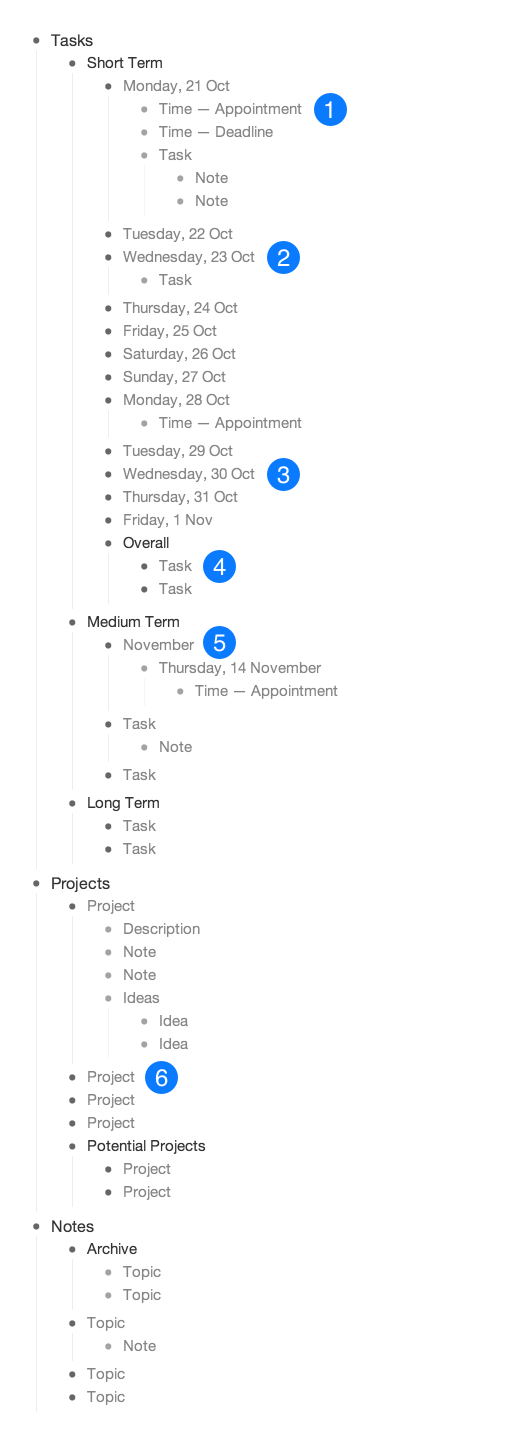
workflowy_v2_v2

What’s new in this version

1. Appointments now go in Workflowy and only Workflowy

In the past, I kept appointments in both the iPhone Calendar app and in Workflowy because I liked having appointments in the calendar for quick reference, but also liked having them in Workflowy so that I could plan tasks around them.

As time went by, I found myself only referencing the Workflowy iPhone app while I was out because it represented my true schedule (appointments, deadlines, and tasks) much better than the calendar app alone did. These days I don’t even bother adding appointments to the calendar app; they go straight into Workflowy and that’s all that I reference.

Also, and this is a very minor change, I’ve grown fond of using the em dash (—) instead of a colon to separate the time of an appointment from its description.

2. Short term tasks now include the date

Because I now solely use Workflowy for appointments, having the day of the week and its corresponding date is much more important than before. For example, instead of a Short Term list item being just “Monday” it’s now “Monday, 21 Oct”.

3. Task list timeframes are more flexible

Previously I just included the upcoming seven days or so in the Short Term list and anything farther out than that went into the Medium Term or Long Term lists. These days I’m a bit more flexible with what goes where. Short term tasks, for example, are typically up to two weeks out and things taking place beyond that usually still go in the Medium Term or Long Term lists, but the boundaries are not set in stone.

4. No more focus areas

In the last version, I kept focus areas — things that weren’t tasks but that I wanted to pay attention to during the current week — as list items in the Overall list. I no longer include a focus area; everything in the Short Term, Medium Term, and Long Term lists are tasks that can be completed.

5. Month lists to group long term appointments

I found that as I had more and more upcoming deadlines and appointments several weeks or months out, the Medium Term and Long Term lists would get cluttered with lists of dates. To remedy this, I started creating groups based on the month the appointment or deadline is slated to take place (November, December, etc) and then I collapse it so that there is only one visible list item. As the month approaches, I ungroup the dates and move them into the Short Term list.

6. Projects are no longer divided into groups

This past summer I had an unusually large number of ongoing projects which is why I organized them into groups. I’ve scaled back since then and now only have a few ongoing projects and a few more in my “Potential Projects” list making it unnecessary to organize them into groups.

###

It’s worth noting that this may be the second Workflowy system that I’ve written about, but this has evolved from a much simpler system that I started with in early 2012. If you’re just getting started with Workflowy, start small and improve it over time to see what works for you. Good luck and let me know how I can help.
Redesigning Preceden’s Color Picker

Preceden, the web-based timeline maker that I launched in January 2010, has been slowly growing over the years and while I don’t spend that much time on it these days, I still try to put in a few hours each month to make it better and keep fresh on the code.

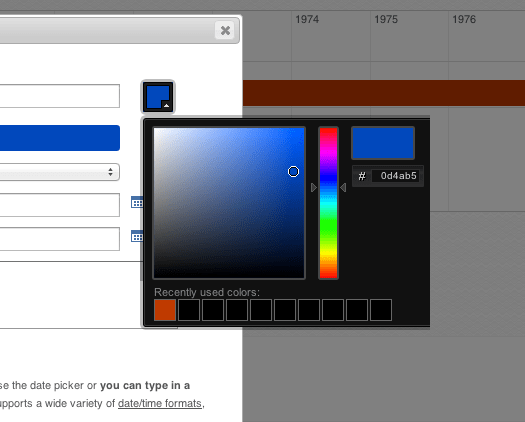
One feature that has always bugged me but that I’ve been procrastinating about fixing is the color picker for choosing the color of an event. Here’s what the interface has looked like for almost all of Preceden’s existence:

When I originally implemented this, my novice thought process went something like this:

  • Users should be able to choose any color they want
  • Building a flexible color picker is hard, so I’ll use an open source one

After a bit of research, I found one, modified it to get rid of some of the unnecessary fields, and added a recent colors section.

Perfect, right?

Well, it worked for the most part but if there’s one important thing I’ve learned building websites and web applications over the last few years is that the simpler you can make your interface, the better. Being able to choose any color sounds good, but in practice users have found this color picker confusing and hard to use. How do you choose normal green from the starting point above? Are you supposed to type something in that field on the right? Are are you supposed to know what hex color codes correspond to what colors?

If you’re building an application for designers having this level of customizability might be a good thing, but Preceden is used by a lot of students, teachers, and other people 99% of whom probably don’t know the difference between #FF0000 and #00FF00.

The straw that broke the camel’s back was this email that I received from a user, Caline, last Friday night:

Can you tell me why I might be having so much problems with the colour selector in Preceden timeline? I cannot get the slider or the moveable dot to work at all. To make colours I have been trial and error changing numbers of colours to make new colours, very frustrating. At least is there a list of colour numbers you can send me to enter?

Despite my best efforts to ensure the color picker worked across all browsers, issues always pop up every few months that make me want to find another profession. Because the color picker wasn’t working for her, Caline had resorted to typing in random numbers to generate different colors.

I responded to her email, apologized, asked her go to SupportDetails.com, download the PDF report, and send it to me so I could figure out what browser she was using in the hope that it would help me track down the cause of the bug. I also Googled “html color codes” and sent her a link to the top result, html-color-codes.info. I was about to move on and wait for her response to troubleshoot the issue when it hit me: this is crazy. The color picker has been a major pain for me and for Preceden’s users for years. It was time to fix it.

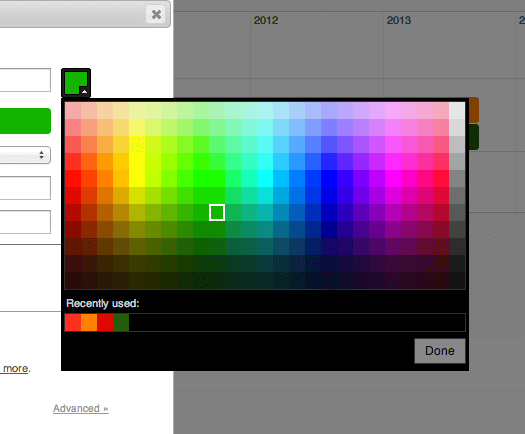
Using the colorful table on html-color-codes.info as a starting point, I set out to redesign the color picker from the ground up. Here is the result:

preceden_color_picker_new_525_v2

A few highlights:

  • Users no longer have an option to enter a hex value. If you can’t find a color on that palette that suits you, Preceden probably isn’t the right product for you.
  • The recently used colors are now actually sorted by when you last used it (the old version showed colors that were in use, but wasn’t sorted). It also shows 25 max instead of 10.
  • For new events, the random color that it chooses (from a predefined list that I created using the colors on this palette that I think look the best) is guaranteed not to be one of the colors you recently used. This is important because most users want color variety and without any checks in place, the color that it assigned to a new event might have been the same color that was used for the last event, making your timeline look not quite as good as it could.
  • The simplicity makes it much easier to ensure it works across all browsers.
  • Because it’s a bit wide, if positioning it like the screenshot above makes it fall off screen, it’s automatically repositioned so that it falls on the screen (important for students who typically use Preceden in computer rooms with small monitors).

All of these should contribute towards a vastly better experience for one of Preceden’s most frequently used features. And it took about 3 hours. Why didn’t I do this sooner?

I wrote Caline and let her know about the new color picker. A few hours later she replied:

Hey this works great now, love the new colours palette. Thank you!!! :)

This makes my work so much easier. Thanks!!

My question now is whether this can be simplified even more. Users might not even need this quantity of colors to choose from. What do you think? Any suggestions?

The Virtues of Public Accountability

I’m a huge fan of public accountability, a concept I first read about on Sebastian Marshall’s blog. The basic idea is that stating your goals publicly makes you a lot more likely to follow through and achieve them.

For example, a few years ago I was working on a web-based high fidelity mockup tool and kept pushing back its launch. I decided to experiment by publicly committing to launch by a specific date that was aggressive for where I was at with the project. I wound up working like hell to meet that deadline and actually beat it by more than a week.

Why does publicly committing to something have an impact? For a lot of people, including myself, it’s important to be perceived as consistent. If I tell people I’m going to do something, I want to be the type of person who does. By publicly stating that I’m going to do something, the fear of failing and being perceived as someone who says they’re going to do something but doesn’t creates a strong incentive for me to actually do it. Even though I know there’s no real risk in failing (who cares?), it still pushes me to work faster and harder than I otherwise would have.

Another benefit of publicly stating your goals is that people will often try to help you achieve them. Maybe it’s encouragement; maybe it’s advice because they’ve been where you are and know the ropes; maybe they have resources or connections that will help you reach goals faster.

I encourage you to try publicly writing about your goals. You might be surprised by how well it works for you.

Reviving the ALL IN Expert Archive

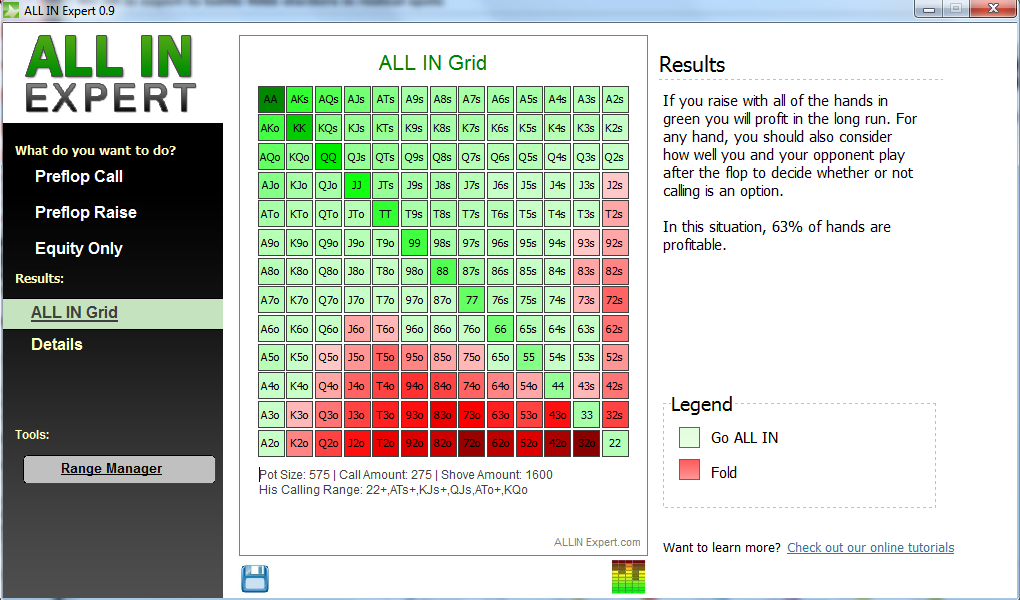
allinexpert

A few months ago while switching servers the archive for ALL IN Expert, a poker calculator that I built in 2008, went offline. Despite receiving several emails a month from folks looking to download it, I’ve been procrastinating putting it back online.

Without further adieu, here is the ALL IN Expert archive complete with guides and a download link.